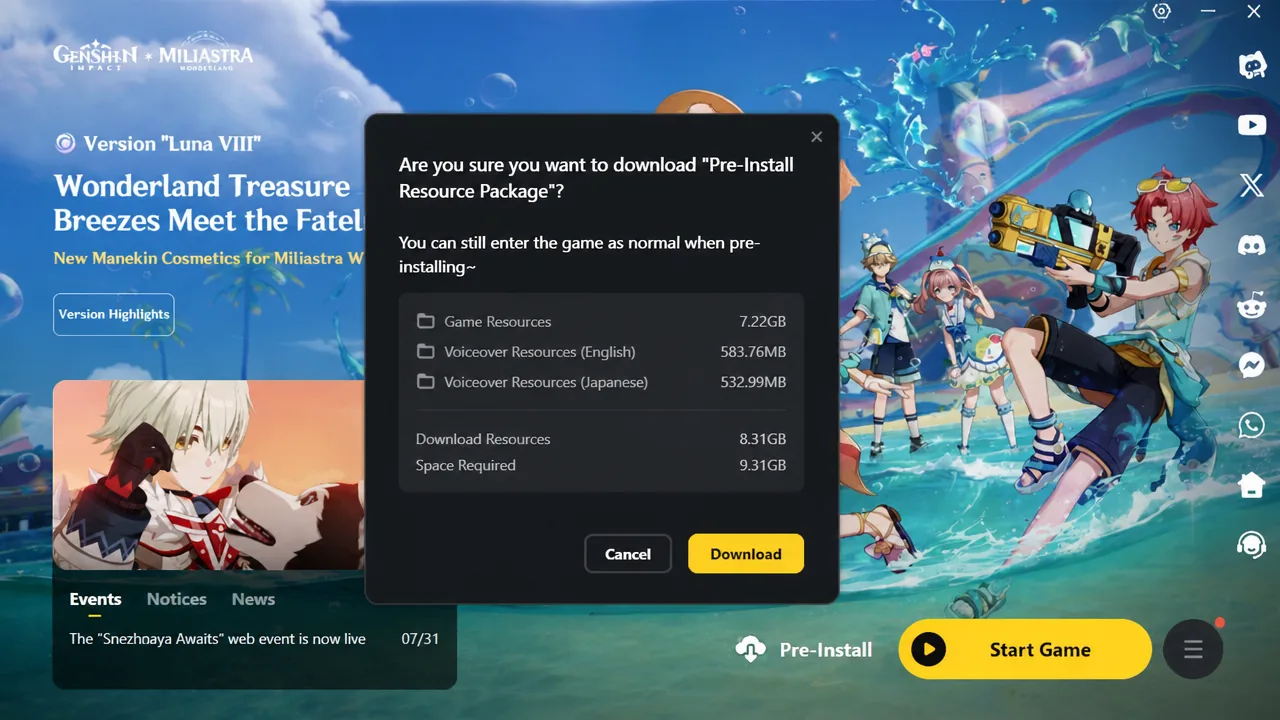
Preloading Genshin Impact 7.0 lets you pull the patch files onto your device before the update goes live on August 12, 2026. Doing it early trims your wait on launch day, since the game only needs to unpack and apply what you already downloaded once maintenance ends. The update brings the new characters Odette and Alyosha, along with the long-teased Snezhnaya region.
Quick answer: Open your launcher or the game’s login screen, tap the pre-install/pre-download button, and confirm. You will need roughly 8 GB free on PC and about 3 GB on mobile, and you cannot play until maintenance finishes on August 12.
Genshin Impact 7.0 preload sizes by platform
The numbers below cover the base English download. Your actual size climbs if you keep multiple voice-over packs installed, and the game decompresses the package during final installation, so leave extra headroom on the drive.
| Platform | Preload size |
|---|---|
| PC | About 8 GB (roughly 8.7 GB for the ZIP package) |
| Android | About 3 GB |
| iOS | About 2.6 GB |
When preload opened on each server
Preload for version 7.0 is already available across regions. If the button has not appeared yet on your account, update your launcher or restart the mobile app to force it to show.
| Server | Preload start |
|---|---|
| America | August 9, 2026, 10:00 PM (UTC-5) |
| Europe | August 10, 2026, 4:00 AM (UTC+1) |
| Asia | August 10, 2026, 11:00 AM (UTC+8) |
| TW, HK, MO | August 10, 2026, 11:00 AM (UTC+8) |
How to preload on PC
How to preload on Android and iOS
There is a second route inside the game if the login-screen button does not appear. Log in, pause once your character loads, open the settings menu, go to the Other tab, and select Pre-Install Now under the Resource Package row.
Note: Mobile storage is tight for many players. On a nearly full device, the download can stall partway, so clear space before you start rather than mid-download. Switching to a smaller voice pack, such as Korean, reduces the footprint if you are short on room.
How to preload on PlayStation 5
How to preload on Xbox Series X and S
When you can actually play version 7.0
Preloading only stages the files. You still cannot log in until the 7.0 server maintenance on August 12 wraps up. Once the servers reopen, reopen the launcher on PC and click Update, or relaunch the mobile app, and the game applies the staged files without a fresh download.
You will know it worked when the launcher shows a Start or Play button instead of Update, or when the mobile app opens straight to the login screen with 7.0 content available. From there you can head into the new Snezhnaya region and try out Odette and Alyosha.