If you’d like to manage your privacy on Microsoft Teams, turning off read receipts can be a useful step. This allows you to read messages without notifying the sender that you’ve seen them. Here’s how you can disable read receipts in Microsoft Teams.
What are Read Receipts?
Read receipts are notifications that inform senders when their messages have been viewed. While they can be helpful for confirming receipt, they might also create pressure to respond promptly. Disabling this feature can give you more control over your communication.
How to Disable Read Receipts in Microsoft Teams
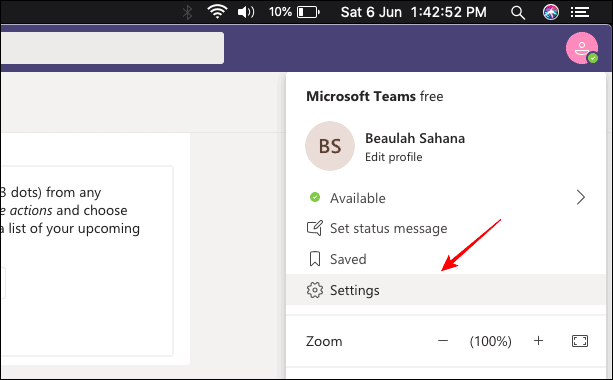
Open the Microsoft Teams application on your desktop. Click on your profile picture located at the top-left corner of the Teams window to access your account options. From the dropdown menu, select ‘Settings’.
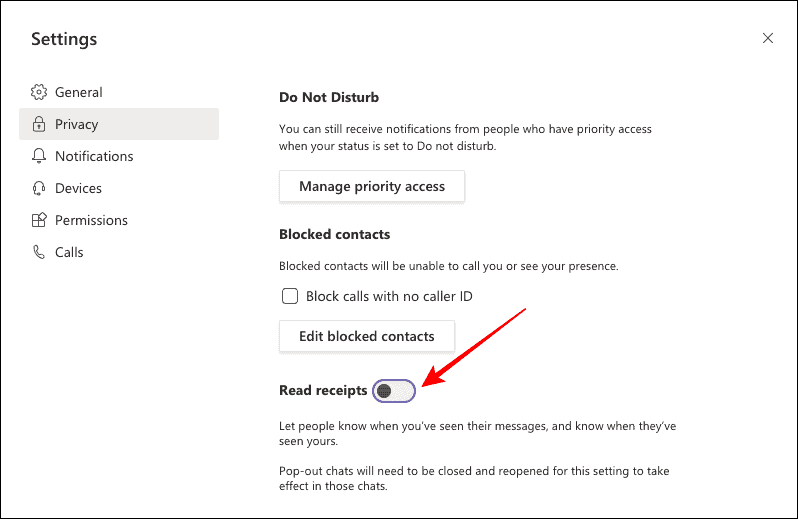
In the Settings window, click on the ‘Privacy’ tab on the left side. This will display various privacy options available in Teams.
Look for the ‘Read receipts’ setting in the list. Click the toggle switch next to ‘Read receipts’ to turn it off. The toggle will turn grey, indicating that read receipts have been disabled.
Now, you can read messages without the sender knowing you’ve seen them. Keep in mind that with read receipts turned off, you also won’t receive notifications when others read your messages.