Once Human supports full cross-progression across PC, mobile, PlayStation 5, and Xbox Series X|S, so a character you built on one platform can continue on another once the right accounts are linked. The system runs through a NetEase account, and the order in which you link matters because existing character data can be overwritten during the process.
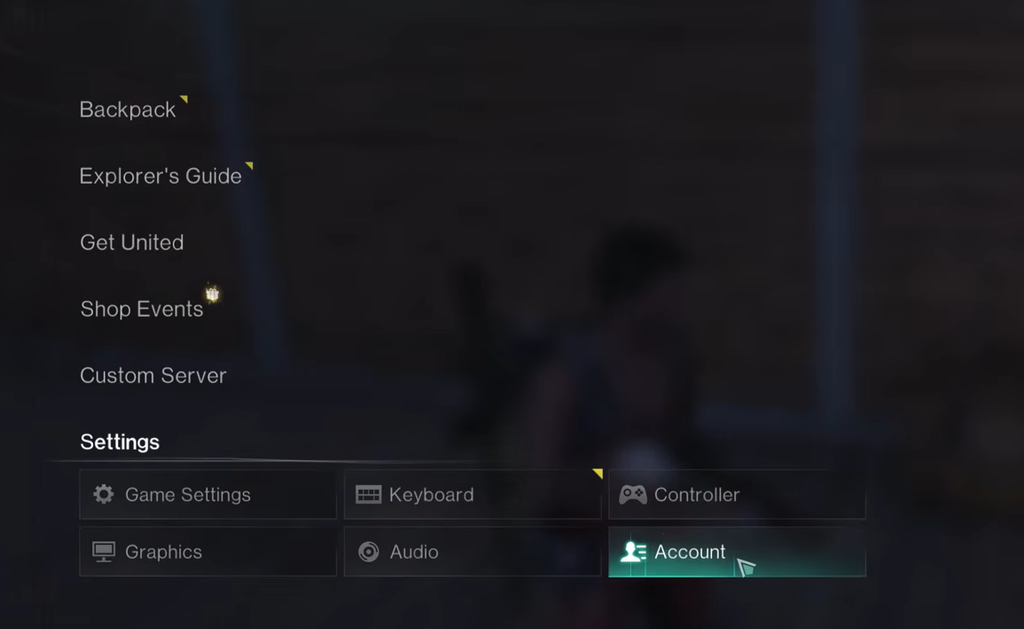
Quick answer: Open Settings → Account in Once Human, sign in with the NetEase account that holds the character you want to keep, then link your Console Account (or link from console to PC/mobile). Do this once, from one platform to the other, before creating a new console character.
What cross-progression covers
Cross-play and cross-progression are two different features. Cross-play lets players on PC, mobile, PlayStation, and Xbox play together in the same session. Cross-progression syncs your own account progress between those platforms once they are linked.
Progress sharing works through account linking, not by merging two separate accounts. Unless the game explicitly offers a merge on-screen, characters, inventories, and currencies from different accounts do not combine into one roster.
Cross-region progression is not supported, because different regions run from separate data centers. If you want to play with friends, everyone needs to reach the same compatible server environment.
| Feature | Status |
|---|---|
| Cross-play (PC, mobile, PS5, Xbox) | Supported from console launch |
| Cross-progression | Supported from console launch |
| Cross-region progression | Not supported |
| Base game price | Free to play |
Before you start: prepare the right account
If you already have progress, sort out your accounts before your first console login. The most common cause of lost progress is starting the console version first and accidentally creating or selecting the wrong account.
Begin with the account that currently holds the character you want to keep. Open Once Human on PC or mobile and confirm the login method, account identifier, server, and character name. Then confirm the PlayStation Network or Xbox account you plan to use on console. Avoid linking from a shared family profile unless that is genuinely the profile you will play on long term.
Never share a password, verification code, recovery code, or device approval token with anyone. Cross-progression setup does not require you to hand over control of either account, and no third-party page is needed to “accelerate” a transfer.
How to link accounts and move progress
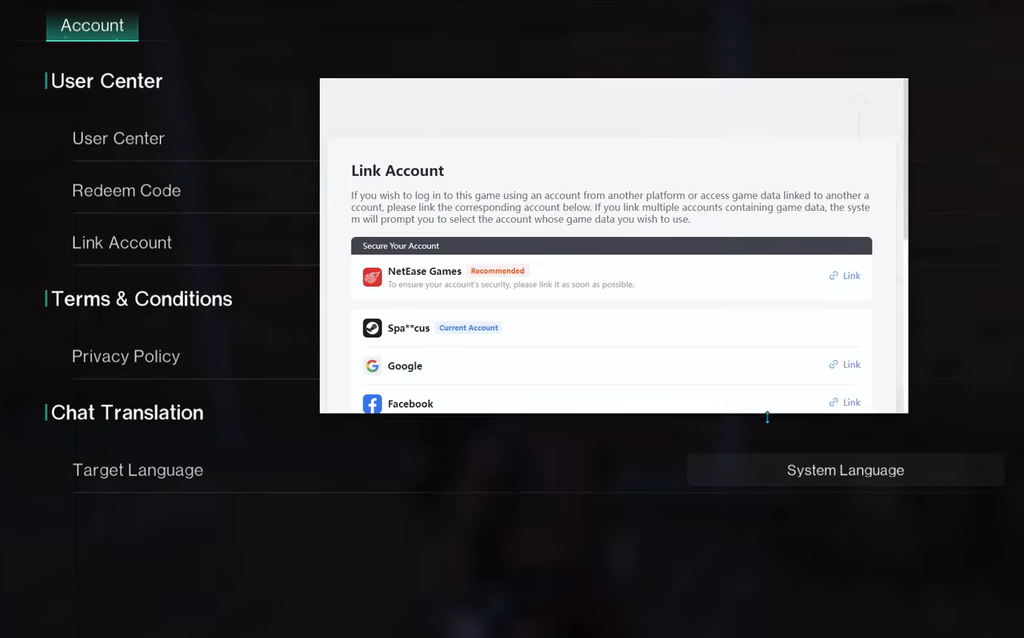
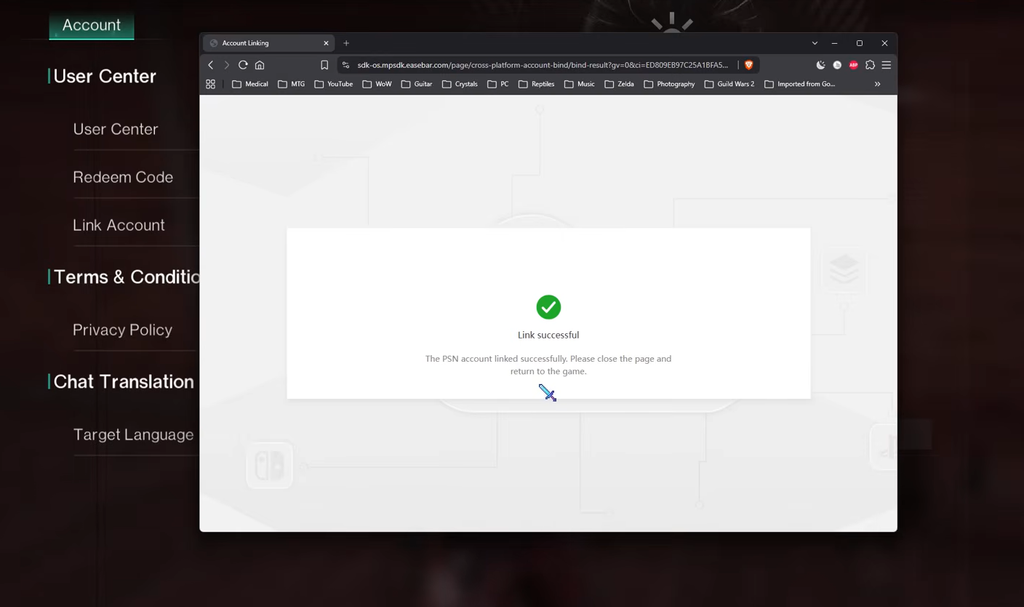
Do the linking once, from one platform to the other. If you attempt it in multiple directions, cross-progression cannot be tracked properly and can result in progression loss.
The character overwrite warning
This is the part you cannot skip. When you link two accounts that each contain character data, the process can require you to choose which account’s data to keep. The account that is not kept can have its characters discarded.
So linking is not a way to combine two rosters. If you have meaningful progress on more than one account, stop at the linking screen and review exactly what will be preserved before confirming. Switch to or create the correct account when the on-screen guidance tells you to, so the character you want survives.
A safe sequence for existing players:
- Open Once Human on the PC or mobile account with your main character.
- Confirm exactly which account you are signed into.
- Open the account-linking option and confirm this is the data you want to keep.
- Complete the link, then verify it worked.
- Only then sign into the console version.
Confirm the link worked
After linking, compare the account identifier shown on console with the one you recorded on PC or mobile. Check the server and character list before you make any purchases or start a long session.
Enter the game and inspect a few stable data points to confirm the correct profile loaded. Look at the character name, current scenario, inventory categories, cosmetics, currency balances, and progression records. If the wrong profile appears, stop before creating new progress or buying anything.
To check cross-play, invite a trusted friend using the game’s friend or team system and confirm you are both in a compatible environment. One failed invite is not proof cross-play is broken, so check the server, version, and privacy settings first.
Servers and scenarios still matter
Cross-progression does not remove the need to pick the correct destination. Once Human uses scenarios and servers as core parts of its structure, so an existing character’s participation, settlement state, and scenario schedule should be read from the live interface.
Before joining friends, exchange the exact server or scenario name shown in the client, since similar names cause confusion. If the game provides an invitation or team code, use that instead of relying on typed names alone.
Returning players should also check whether their previous scenario is active, settled, or in another phase. Linking accounts lets supported progress move across platforms, but it does not reopen an expired scenario or rewrite scenario timing.
Subscriptions, purchases, and premium features
The base game is free to play, so you do not need PlayStation Plus or Xbox Game Pass just to play it. Premium content, including the Deluxe Season Pass, deviation skins, and character cosmetics, is unlocked for players with an active Game Pass or PS Plus subscription.
Cross-progression covers game progress, not payment processing. Store products, wallet balances, and transactions may follow platform-specific rules, so check the live product page and confirm the account, platform, region, item, and amount before buying. After a purchase, verify whether the resulting currency appears on your other linked platform.
Don’t treat the console beta as the final release
During the console open beta, PC and mobile cross-play was not available. Xbox and PlayStation players could still play together because the console servers were unified for that test. That restriction belonged to the testing phase and does not describe the full release.
Because of that difference, follow the current in-game linking instructions rather than an old beta walkthrough. If you still have a test client installed, verify the official release download first, then confirm the publisher, supported platform, release date, and product name on the store page before installing.
The console release also adds a first-person perspective you can switch to at any time, alongside the existing third-person camera, plus Quality Mode targeting 4K at 60 FPS and Performance Mode targeting up to 120 FPS. None of this changes how linking works, but it explains why the console launch is more than a straight port. Handle the account link carefully and your progress will follow you wherever you choose to play.