Trading in STREET FIGHTER 6 x UBG lets you swap items directly with other players, but the feature stays locked until your account clears two fixed checks. Once both are met, a Trade button on the hub interface opens the full trade flow and a separate Trade Hub where you can set up offers without the main chat filling with requests.
Quick answer: Earn 50 knockdowns on a Roblox account that is 30+ days old, then click the Trade button on the lower right of the hub to unlock Trading and the Trade Hub.
Trading requirements in STREET FIGHTER 6 x UBG
Both conditions below must be satisfied. If either is missing, the Trade Menu shows the notice YOUR ACCOUNT IS NOT ELIGIBLE FOR TRADING and lists what you still need.
- 50 knockdowns earned in combat.
- A Roblox account that is 30+ days old.
Meeting both of these unlocks two things at once, labelled in the menu as UNLOCKS: TRADING + TRADE HUB. The account age check is set by Roblox account creation date, so it cannot be rushed with gameplay. Knockdowns come from winning fights against other players.
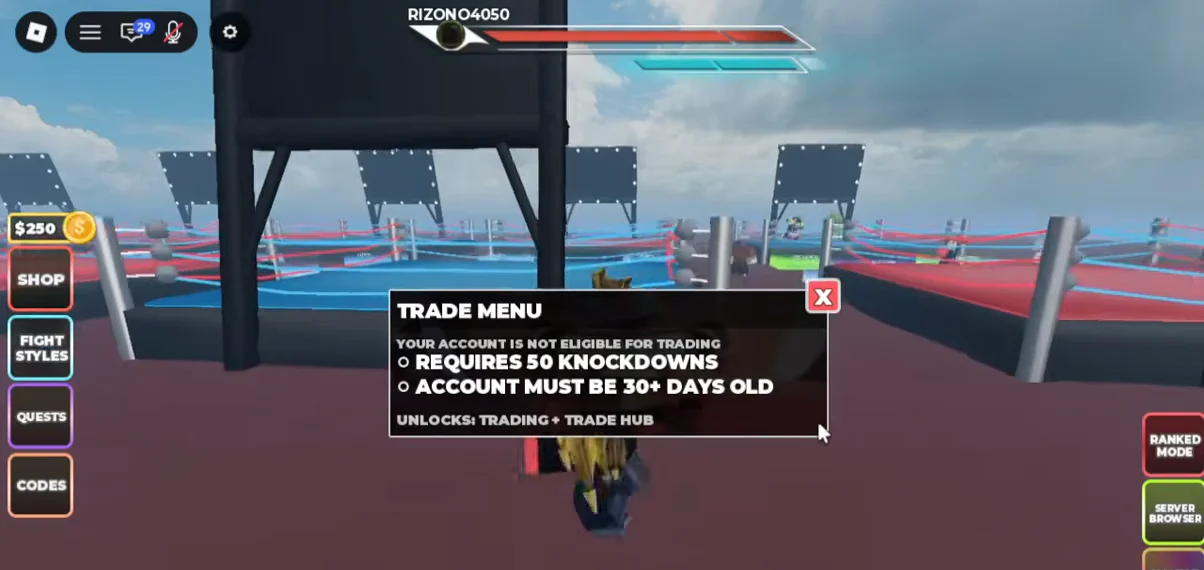
How to open the Trade Menu
Opening this menu is also how you check your current progress, so you can confirm your knockdown count and account status before you expect trading to work.
How to trade with another player
With trading unlocked, the Trade Menu lists every player in the server with a trade option beside each name, plus a button that teleports you to the Trade Hub.
What you can trade
Several item types can be moved between players through the trade panels. These cover both your gear and your spin economy.
- Gloves
- Spins and Lucky Spins
- Cash
- Style Slots
- Lucky Crates
Using the Trade Hub
The Trade Hub is a separate area reachable only through the trade menu. It uses a stall-based layout similar to a donation game, where you claim a stand and add your own text to advertise what you are offering.
Other players can walk up to your stand and start a trade from there. The point of the separate lobby is to keep trade requests out of the main game chat, so the hub stays dedicated to setting up and completing swaps.
How to confirm trading is unlocked
You know the feature is active when the Trade Menu no longer shows the ineligibility notice. Instead of the requirement list, it displays the server player list with trade options and the Trade Hub teleport button. If you still see REQUIRES 50 KNOCKDOWNS or ACCOUNT MUST BE 30+ DAYS OLD, that condition is not yet met and trading remains locked until it is.