Steal an Anime Pack gives each title and mutation its own sound. Because the screen can get crowded, that sound is often the quickest way to notice one. The game’s background track loops nonstop, and every title or mutation cue plays over it. A bright chime, a magical shimmer, a heavy bass hit, or a thunderclap with a monster roar each tells you something just happened.
Quick answer: Manage titles from the TITLES button in the top menu. Each title and mutation plays its own cue, such as a chime, shimmer, impact, or thunder-and-roar, so listen while your packs grow and open.
Where titles live in Steal an Anime Pack
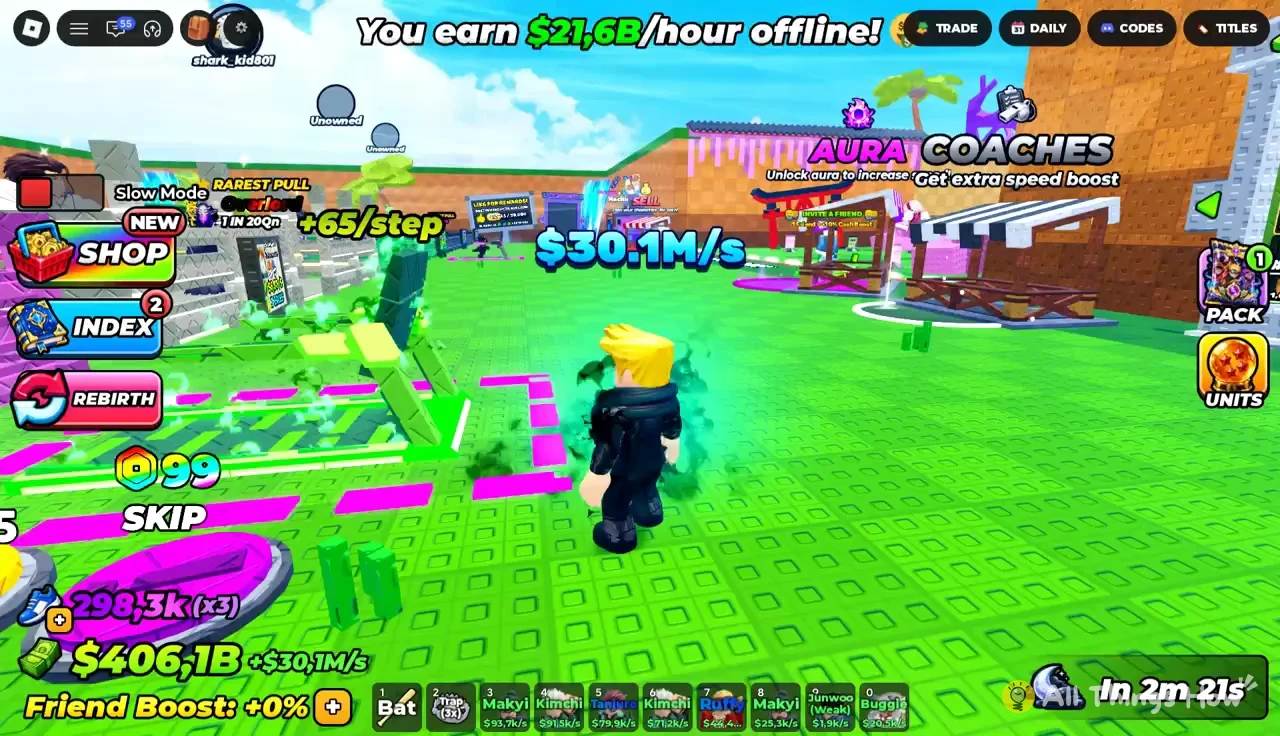
Titles have their own button in the strip of menu buttons across the top of the screen. That strip has four buttons in this order: TRADE, DAILY, CODES, and TITLES. Tap TITLES to open title management. This is where you check and handle the titles your account has earned.
The other three buttons in that strip handle separate jobs. TRADE opens trading with other players. DAILY holds daily rewards. CODES is where you redeem codes. None of them changes your titles, so if you want titles, go straight to the last button.
Growing and opening packs on your base
You spend most of your time in Steal an Anime Pack moving packs back to your base and working through them. The pack controls sit in a panel on the right side of the screen, and that is where you will most often hear title and mutation cues play. The steps below follow the order the panel uses.
Growing Packs. Every pack currently growing on your base shows up here with a progress percentage, so you can see which ones are close to done and which have just started.TAP AGAIN! to keep opening a pack. Other packs keep growing in the same panel at the same time. In the example below, one pack sits at 8% while another is ready for another tap.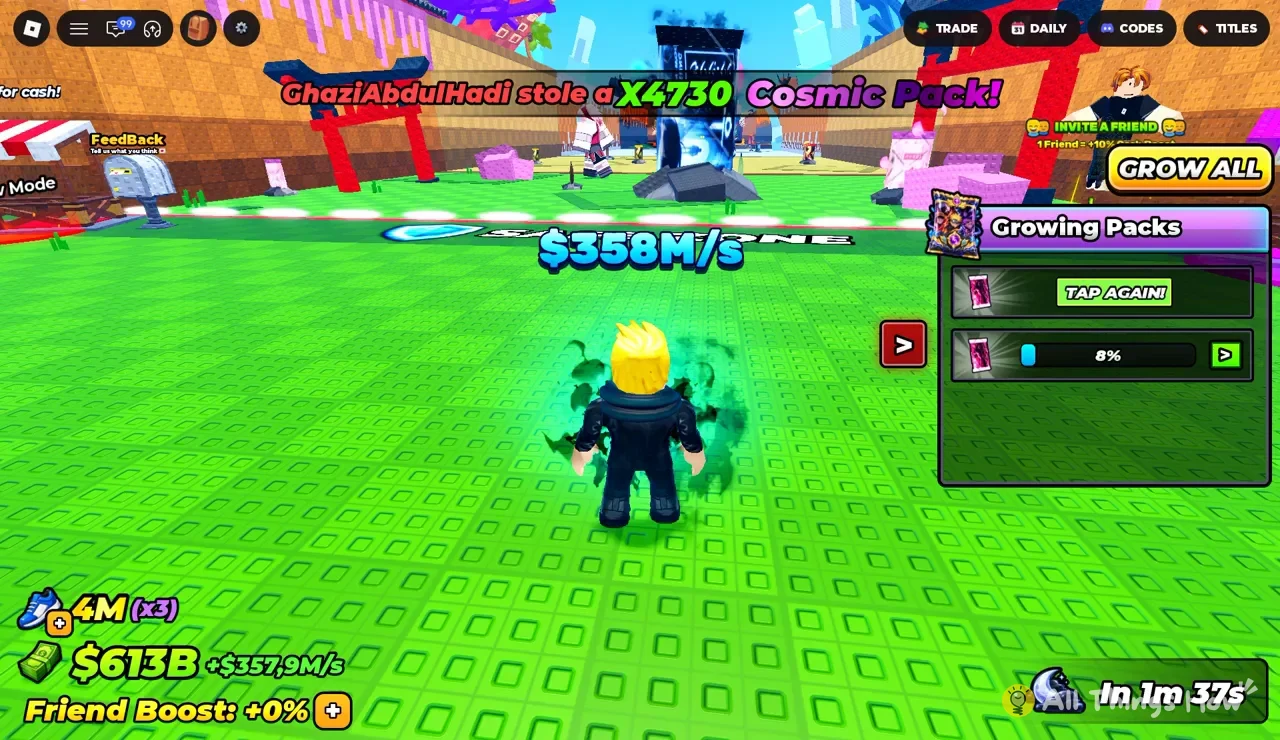
GROW ALL at the top of the panel when several packs are waiting. It applies to every pack in the panel at once, so you don’t have to tap through them one by one.TITLES or look at your base to see what changed.The cues can play over any screen. They will reach you even if you are mid-run carrying a pack across the map, so you don’t have to be looking at the panel to catch one.
Title and mutation sound cues reference
Titles and mutations do not share one generic sound. Each has its own cue, and the cues fall into four groups you can tell apart quickly once you have heard them a few times. Use the table to work out what kind of sound you just heard.
| Cue family | Cues in the family | What it sounds like |
|---|---|---|
| Chimes and bells | Chime, bell ding, ringing chime, high ping, rapid chime | Short, crisp, bright |
| Melodic sparkles | Ascending melody, magical twinkle, synth rise | Rising notes, sparkling |
| Magic and energy | Shimmering aura, harmonic pulse, charge pulse, deep resonance, energy burst, warp | Shimmers, whooshes, pulses |
| Impacts | Blast impact, bass drop, sub-bass boom, impact strike, blade slash | Thuds, booms, slices |
| Thunder and roars | Thunder strike, heavy lightning, roaring thunder, roar and thunder | Thunderclaps with creature growls |
Chimes and bells are the lightest cues. They are quick dings and pings, and the background music almost drowns them out, so they are the easiest to miss in a busy server. The high ping in particular sounds a lot like an ordinary notification.
Melodic sparkles climb in pitch. The ascending melody runs up a quick series of chimes, the magical twinkle sparkles, and the synth rise is a short electronic tone that climbs. These are easy to tell apart from the single-note chimes because they move.
Magic and energy cues sit in the middle. The shimmering aura is high and glittery, while the charge pulse and deep resonance sit much lower, as a resonant whoosh and a low chime. The energy burst is a sharp detonation, and the warp is a fast swoosh that sounds like a dimensional jump.
Impacts are percussive and short. The blade slash is a clean weapon slice, the impact strike is a blunt hit, the blast impact is a muffled burst, and the bass drop and sub-bass boom are deep low-end thuds you feel as much as hear on headphones.
Thunder and roars are the loudest group by a wide margin. Each pairs a crashing thunderclap or electric blast with a monster growl or beast roar. You can’t miss them over the background music, even in a crowded server.
Other visual signals on the Steal an Anime Pack HUD
Sound is the fastest signal, but the HUD tells you plenty as well. Effects can show up on your avatar itself, such as a dark particle aura swirling around the legs. Other players in the server can see these too, which makes your base a more visible target.
- Overhead cash rate: a figure such as
$358M/sfloats above your avatar and shows your passive income. - Bottom-left gauges: total cash with its per-second rate, plus your current Friend Boost.
- Friend invites: the top-right prompt shows that each friend adds a +10% cash boost.
- Theft banner: a top banner tells the whole server when someone steals a high-tier pack, such as a Cosmic Pack.
- Event timer: a bottom-right countdown shows how long until the next event starts.
Watch the theft banner closely. It is server-wide, so when you pull something valuable, everyone in the server knows a strong pack is in play. If a heavy thunder-and-roar cue goes off while a rival’s name scrolls across the top, get your best packs back onto your base and open TITLES once things calm down to see what you earned.