Set a larger shader cache and, when necessary, clear old shader data to fix Borderlands 4 stuttering that appears during gameplay or right after patches. Shader cache stores compiled shaders on disk; when it fills up or becomes inconsistent, the game rebuilds shaders during play, which causes hitching. Recent updates may also increase stutter until compilation finishes, so plan a short rebuild period after changes.
Increase NVIDIA shader cache size (100 GB)
This change gives the driver more room to store compiled shaders, which can greatly reduce repeated compilation stutters in Borderlands 4 on NVIDIA GPUs. You can revert this after your playthrough if disk usage grows too large.
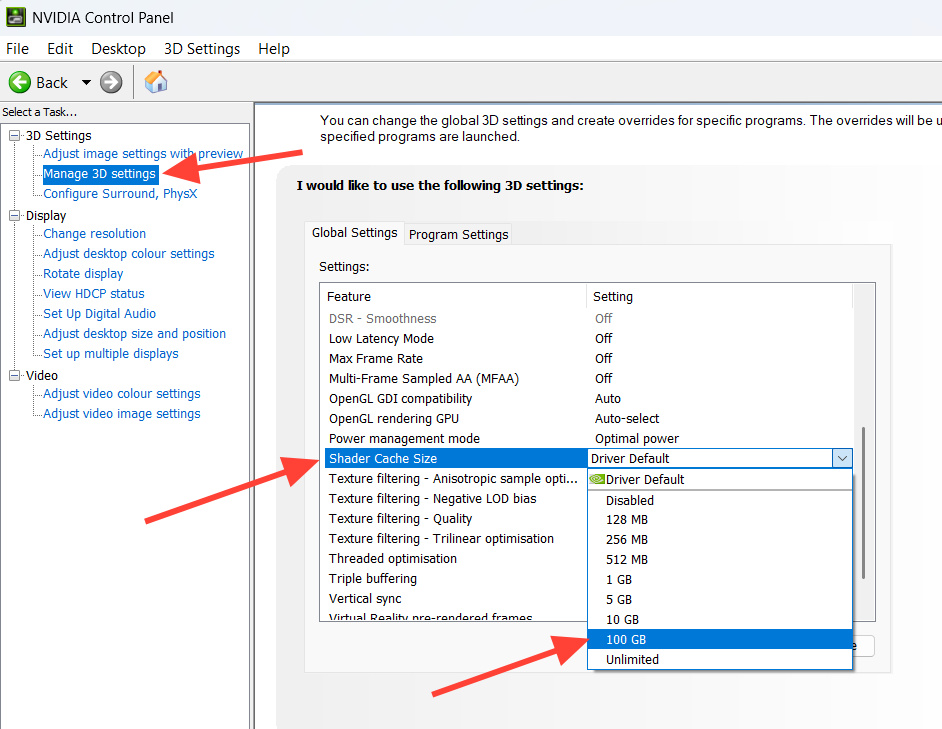
%LOCALAPPDATA%\NVIDIA\DXCache. You can switch Shader Cache Size back to Driver Default after you finish the game.Clear Borderlands 4 local shader cache (game folder)
Deleting the game’s local shader cache forces a clean rebuild, which can resolve persistent hitches introduced by updates or crashes.
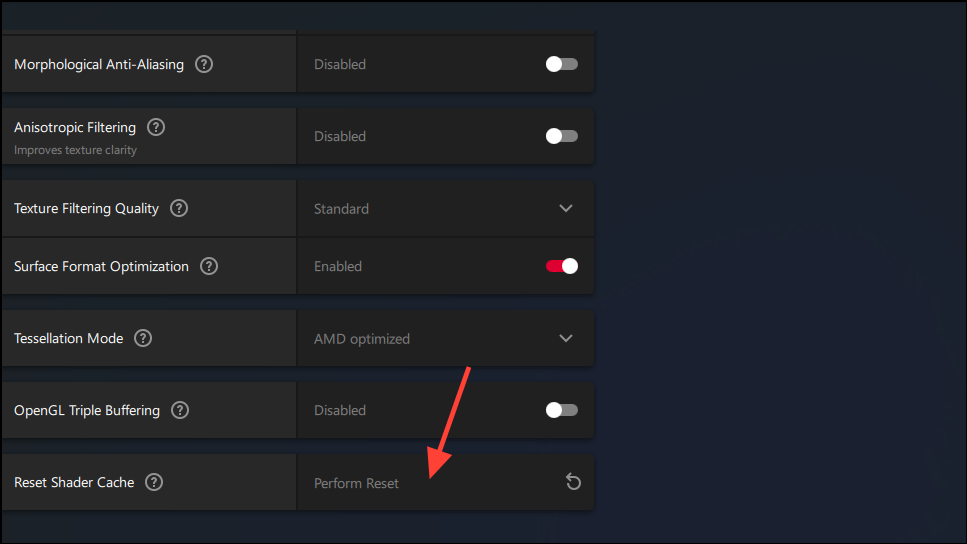
C:\Users\[YourName]\AppData\Local\Borderlands4\ShaderCache. Replace [YourName] with your Windows account name.ShaderCache folder. This removes old or incompatible shader data that can trigger rebuild stutters.Reset AMD shader cache in Adrenalin
AMD’s driver includes a one-click reset that clears shader data used by all games. Only use this if you’re fine with other titles rebuilding their caches too.
Clear NVIDIA driver DXCache files manually
If you prefer a direct file cleanup, you can remove large shader cache entries used by the NVIDIA driver. This affects all games using those shaders.
Windows + R, paste %LOCALAPPDATA%\NVIDIA\DXCache, and press Enter. This opens the driver’s DirectX shader cache folder.Use Steam launch option to clear PSO driver cache
If you hit a severe scenario where the game pegs the CPU at 100% and becomes unplayably hitchy after a crash or shader recompile, clearing the Pipeline State Object (PSO) driver cache on launch can resolve it.
-ClearPSODriverCache in the Launch Options field. This flag clears the relevant cache at startup.-ClearPSODriverCache from Launch Options so it doesn’t run on every start.Let shaders compile in-game (official guidance)
After updates, stutter can persist until shader compilation finishes. Allow a brief period of continuous play so the build completes in the background.
After any cache reset, expect a short “break-in” period as shaders rebuild; performance typically smooths out once the cache is repopulated. If problems persist beyond these steps, revert experimental settings, verify free SSD space, and revisit the cache size setting after your playthrough to reclaim disk space.