How to Fix Computer Doesn’t Come Back After Sleep on Ubuntu 24.10 Desktop
Solve the issue causing Ubuntu 24.10 desktop computers to remain unresponsive after sleep mode
Solve the issue causing Ubuntu 24.10 desktop computers to remain unresponsive after sleep mode
by Pallav Pathak
Ubuntu 24.10 desktop computers sometimes fail to resume properly after entering sleep mode, leaving users with an unresponsive system and forcing a manual reboot. Typically, this issue arises due to power management misconfigurations, problematic hardware drivers, or conflicts with certain scheduled tasks. To resolve this, follow these detailed troubleshooting methods.
Method 1: Adjust Power Management Settings in Ubuntu
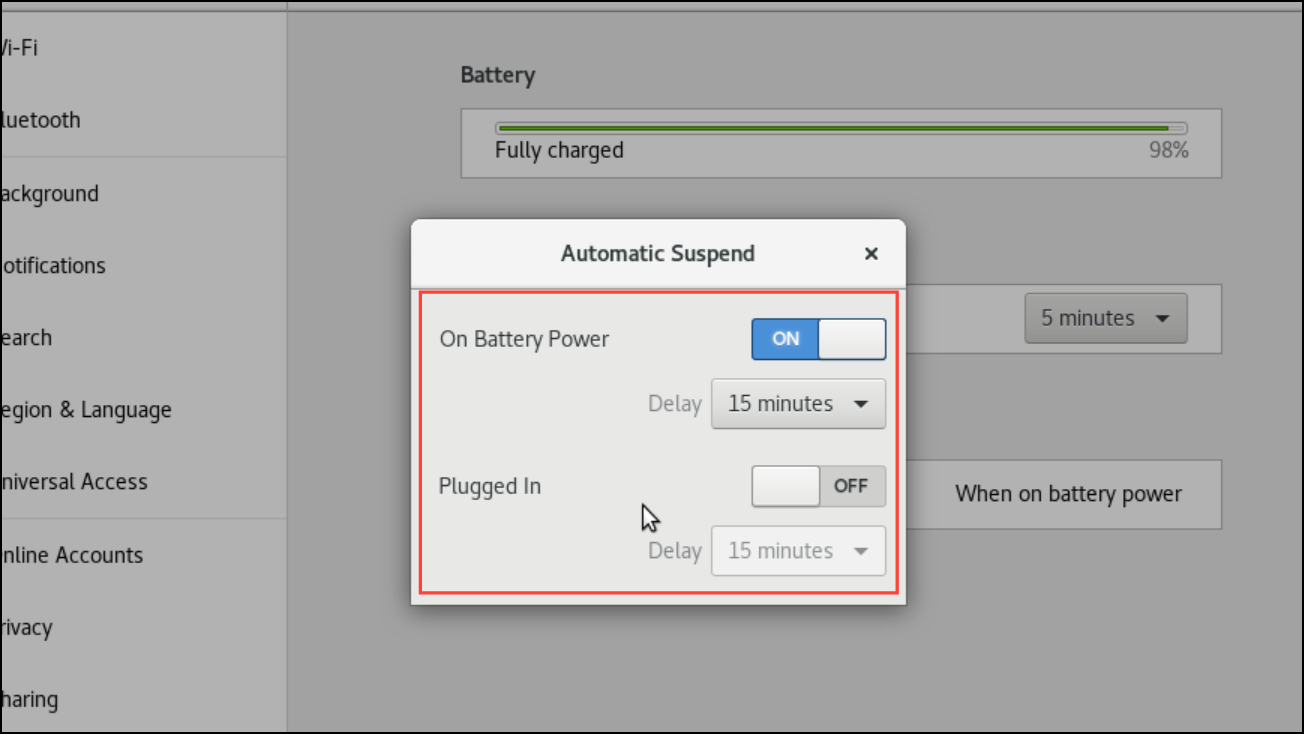
Under the “Suspend & Power Button” section, change the “Automatic Suspend” option to “Off” or extend the duration significantly. Disabling automatic suspension prevents your computer from entering sleep mode unexpectedly.
Close the Settings app and restart your computer to apply these changes fully. Monitor your system for a few days to confirm that the issue no longer occurs.
Method 2: Update Graphics and Hardware Drivers
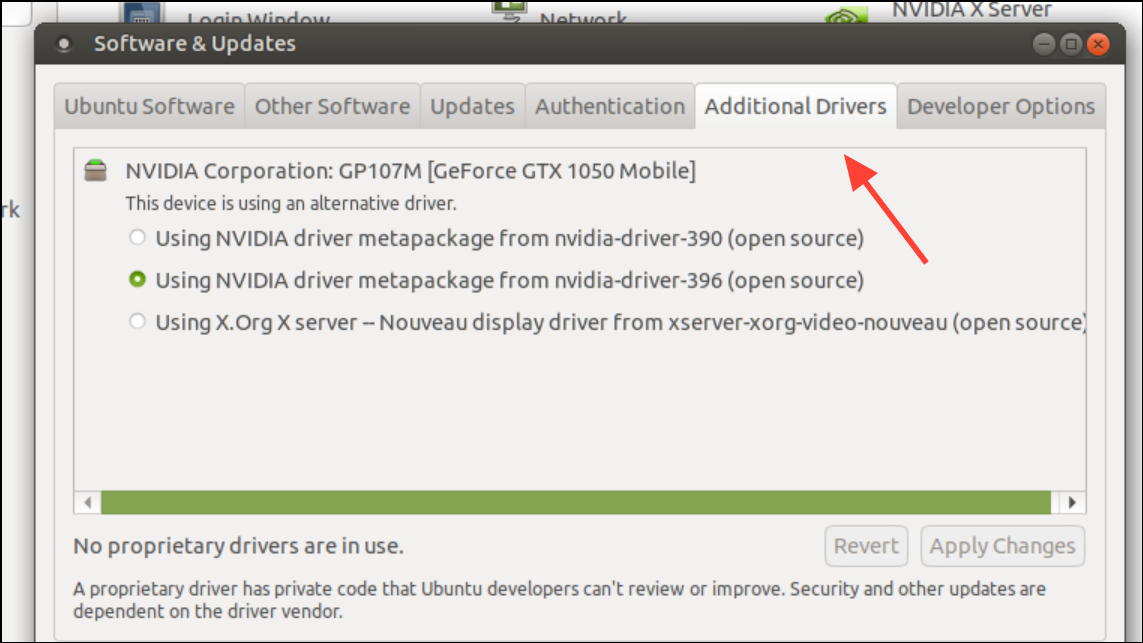
Outdated or incompatible graphics drivers can cause Ubuntu 24.10 systems to fail when resuming from sleep. Updating drivers ensures optimal hardware compatibility and reliable sleep-wake functionality.
Select the recommended proprietary driver (usually marked as “tested” or “recommended”) for your graphics card and click “Apply Changes.” Wait for the installation process to finish completely.
Restart your computer to ensure the new driver is active. Afterward, test your system’s sleep and wake functionality to confirm the issue is resolved.
Method 3: Disable Conflicting Scheduled Tasks
Sometimes, scheduled tasks or cron jobs can conflict with Ubuntu’s sleep mode, causing wake-up failures. Checking and disabling such tasks can resolve the problem.
List all scheduled cron jobs by typing the following command and pressing Enter:
crontab -l
This command displays all scheduled tasks for your user account. Look carefully for any tasks scheduled specifically around the time your computer usually enters sleep mode.
This opens the cron tab editor. Identify and temporarily disable any suspicious tasks by placing a # symbol at the beginning of the line. Save and exit the editor by pressing Ctrl + O and then Ctrl + X.
Restart your system and check if the sleep issue persists. If the problem is resolved, you can gradually re-enable tasks one by one to pinpoint the exact cause.
Method 4: Update Ubuntu and Kernel Packages
Regular updates to Ubuntu and its kernel can fix known sleep-wake bugs and improve overall system stability. Keeping your system updated ensures that the latest patches and improvements are applied.
Test your system’s sleep functionality again to verify that the updates have resolved the issue.
Method 5: Check BIOS/UEFI Firmware Settings
Incorrect BIOS or UEFI firmware settings related to power management can cause sleep and wake issues. Adjusting these settings can stabilize your system’s sleep mode.
Navigate to the “Power Management” or similar section. Look for options like “Suspend Mode,” “Wake on LAN,” or “Deep Sleep.” Adjust settings to recommended defaults or disable advanced sleep states that might cause issues.
Test your computer’s sleep and resume functionality again to confirm that the BIOS adjustments have resolved the issue.
After successfully addressing the sleep issue, periodically check for Ubuntu and driver updates to maintain system stability and prevent similar issues from recurring. With these steps, your Ubuntu 24.10 desktop should reliably resume from sleep without issues.