Mystery Gift codes in Pokémon Pokopia hand out free furniture, decorations, and crafting materials that you can use to fill out your home and habitats. They’re redeemed at any Pokémon Center PC once your Nintendo Switch 2 is online, and no Nintendo Switch Online membership is required to claim them.
Working Pokémon Pokopia Mystery Gift codes
Four Mystery Gifts are currently active, though not every one uses a typed code — some unlock automatically through an internet connection or by owning the Expansion Pass.
P0K0P1AGARDENS— Chansey plant, claimable until October 7, 2026VIA INTERNET— Ditto rug, no code needed, claimable until January 31, 2027EXPANSION PASS— Dynamic Ditto print recipe, unlocked by purchasing the Pokopia Expansion PassEXPANSION PASS— 30 rare Pokémetal, granted via a unique code with an Expansion Pass purchase, claimable until August 31, 2027 and valid until September 30, 2027No code needed— Ditto rug, claimed through “Get via Internet” until January 31, 2027
The Chansey plant code, P0K0P1AGARDENS, is the only shared password on the list right now. The Ditto rug and the two Expansion Pass rewards don’t need a typed code — you claim them straight from the internet download list or automatically after buying the pass.
Unlock Mystery Gift before redeeming codes
Mystery Gift doesn’t appear in your menus right away. It becomes available after you finish the opening tutorial with Ditto, which wraps up once Ditto has rested with Professor Tangrowth, Charmander, Squirtle, and Bulbasaur following your first campfire. This usually takes around 30 minutes of play, ending when you reach the first Pokémon Center PC.
Once that point is reached, select ‘Get Items’ from any Pokémon Center PC, then look for ‘Mystery Gifts’ at the bottom of that menu. Your Switch 2 must be connected to the internet and signed in to a Nintendo Account for the option to work, but you do not need a paid Nintendo Switch Online subscription.
Redeem a Mystery Gift code with a password
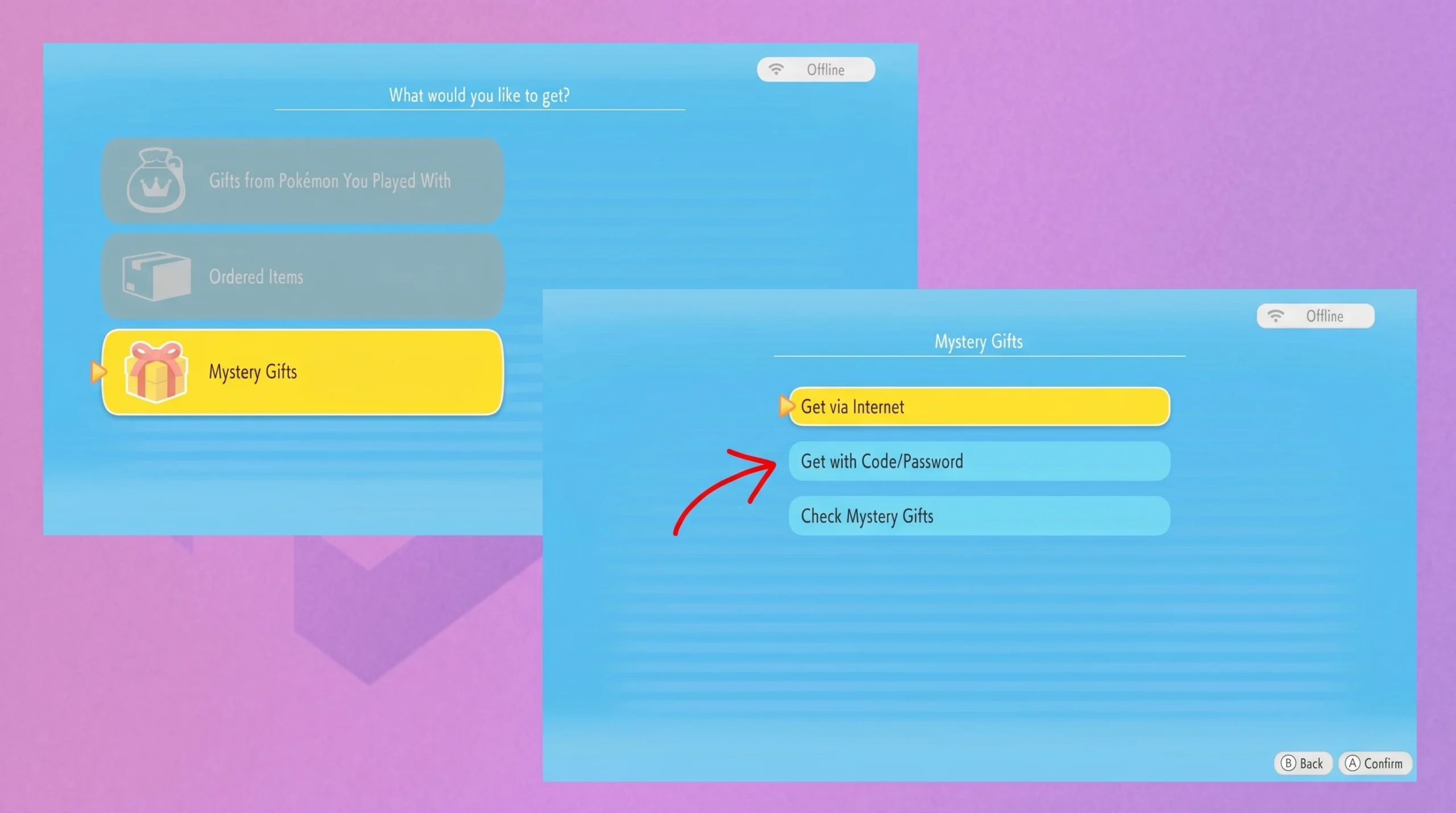
Once the download finishes, the item lands in your inventory or storage right away. That’s your confirmation the code worked — a “code already used” or “code expired” message means nothing was added.
Claim Mystery Gifts that don’t need a code
The Ditto rug doesn’t require typing anything. Neither does the Dynamic Ditto print recipe tied to the Expansion Pass — both download straight from the internet list instead.
Note: Mystery Gifts can only be downloaded or redeemed one at a time. If you leave several gifts unclaimed, work through them one by one rather than expecting a batch download.
To confirm which gifts you’ve already collected, open ‘Check Mystery Gifts’ from the same menu. It lists every reward you’ve downloaded so far, which is useful if you can’t remember whether a particular code or internet gift has already been claimed.

Expired Pokémon Pokopia Mystery Gift codes
Nothing on the current list has expired. The Chansey plant password stays valid until October 7, 2026, the Ditto rug through January 31, 2027, and both Expansion Pass rewards run into 2027 as well.
Check back periodically, since Nintendo tends to roll out fresh Mystery Gift passwords alongside seasonal events and content updates for Pokémon Pokopia.