Shindo Life runs a big part of its social, training, and cosmetic features through text commands you type straight into the chat. These are not exploits or hacks. Rell Games built them on top of the standard Roblox chat, and most of them respond in any normal server as long as you meet their conditions.
Quick answer: Open the chat or the Type Command box at the bottom left, type a command that begins with ! (for example !squad or !village haze), then press Enter. The command runs when you see a confirmation notification, a teleport, or a menu open.
How to enter a command
Every command starts with an exclamation mark so the game reads your text as an instruction instead of a normal chat message. The fastest path is the Type Command box in the bottom-left corner of the screen, but the regular chat box works too and was the original way to run these functions.
! prefix. When a command targets a player or map, replace the bracket placeholder with the exact username or map name, such as !inv Bob.Changed band symbol to Nimbus after a village swap, so you know it registered.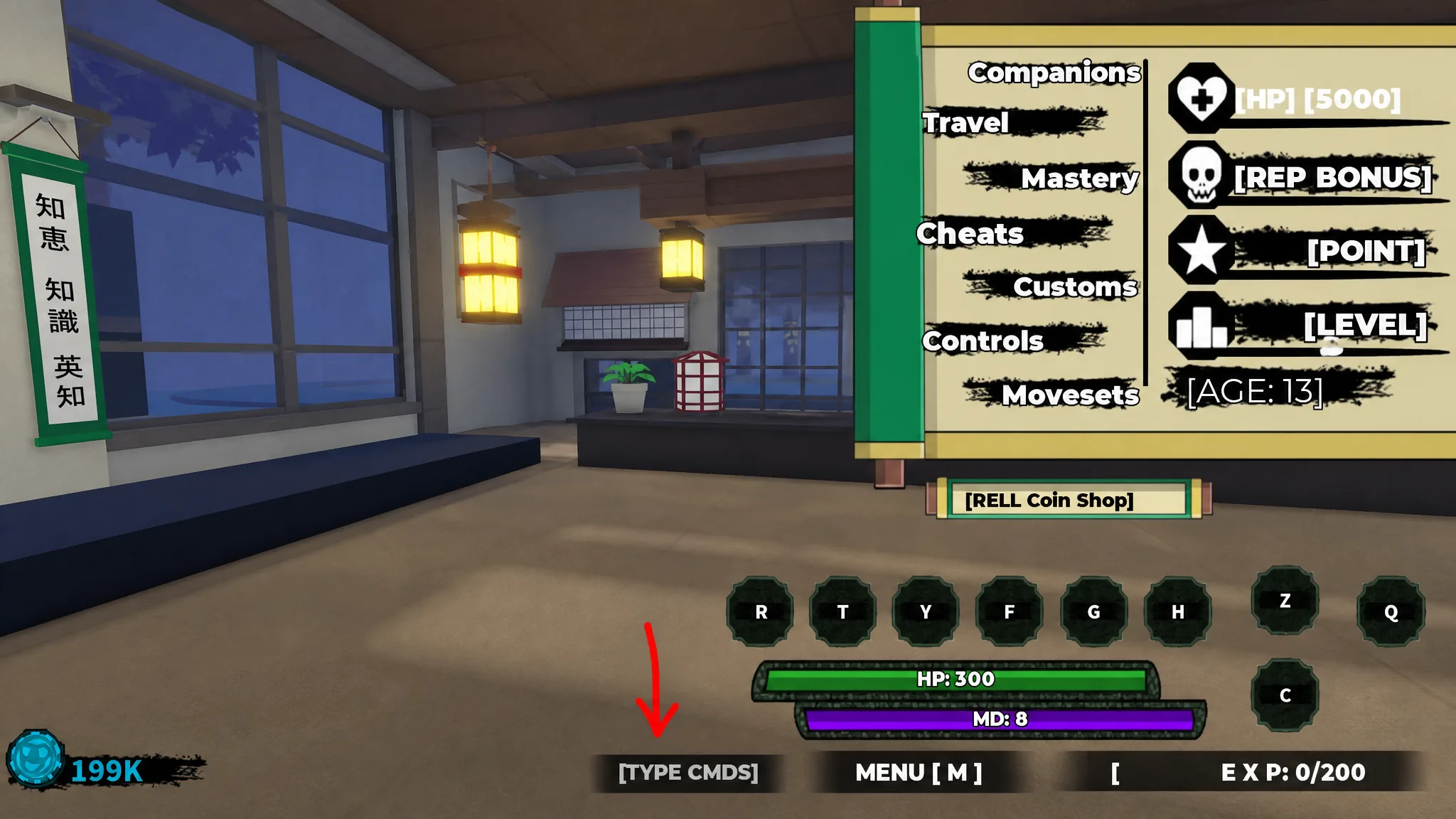
The same commands work across PC, PlayStation, and Xbox, as long as you can reach the chat or Type Command input. Console players use the identical text.
Squad, duel, and social commands
These handle grouping up and starting fights. Duel commands only work when both players stand on a duel pad.
| Command | Effect |
|---|---|
!squad | Creates a new squad. |
!inv [player] | Invites the named player to your squad. |
!acc [player] | Accepts a squad invitation. |
!kick [player] | Kicks the named player from your squad. |
!leave | Leaves your squad, or disbands it if you are the leader. |
!duel [player] | Sends a duel request (both must be on a duel pad). |
!accd [player] | Accepts a duel invitation. |
!1v1 [player1] [player2] | Starts a private 1v1 match between two players. |
!name | Changes your in-game roleplay name. |
!cmds | Displays the full list of available commands. |
!ccmds | Closes the command menu. |
Training commands
Training commands set up and manage practice sessions. A few of these are role-restricted and will not run for every player.
| Command | Effect |
|---|---|
!cpads | Creates a CPAD training session. |
!begin | Starts the selected training session. |
!end | Ends the current training session. |
!reward | Claims rewards after completing training. |
!inf | Shows information about the current training. |
!bell | Starts Bell Training. |
!tm | Starts Team Deathmatch (TDM) training. |
!pushup | Starts Push-Up exercise training. |
!treejump | Starts Tree Jump exercise training. |
!ktrain [player] | Starts Kunai training with the named player. |
!topad | Teleports you to the CPAD training area. |
!ffon / !ffoff | Turns Friendly Fire on or off. |
!cancel | Exits your current mission. |
Tailed Spirit commands and requirements
These cover color customization, the berserk mini-game, and mode upgrades. A Tailed Spirit mode must be active before most of them do anything.
| Command | Effect and requirement |
|---|---|
!spirit | Opens the Tailed Spirit customization menu to recolor its aura. Needs an active Tailed Spirit mode and two spins to reroll the color. Does not work with Rab, Tyn, or Gen 1 spirits. |
!spirit off | Exits the Tailed Spirit customization room. |
!beserk | Auto-attacks nearby targets with melee, Z, and Q abilities while answering your Tailed Spirit’s questions. |
!Tentacion | Activates Tentacion Mode for a Level 2000 Tailed Spirit. With a Gen 3 spirit equipped, it teleports you to the Tentacion Boss Arena to unlock Stage 4. Does not apply to Gen 1 spirits. |
When you enter the spirit realm with !spirit, an on-screen prompt reminds you to type !spirit off to leave. Use the randomize option to reroll the aura, then confirm the color before exiting.
Headband, village, and cosmetic commands
Your headband symbol reflects a chosen village, and a slash marks you as a rogue. A separate set of commands recolors companions and weapons. Some recolor options open a Roblox purchase prompt and cost Robux, so read the prompt before confirming.
| Command | Effect |
|---|---|
!village [village] | Sets the headband symbol to a village such as Ember, Haze, Nimbus, Dunes, Obelisk, Tempest, or Vinland. |
!cross on / !cross off | Adds or removes the crossed-out slash that marks you as a rogue. |
!cdog | Changes the color of Okami’s dog through a paid Robux prompt. |
!renaxe green/gold/ruby/random | Recolors the Renshiki Axe. Green, gold, and ruby are free; random opens a paid Robux prompt. |
!puppet | Opens Puppet Art customization for the mask, head, cloak, and accessory. |
!revertface | Removes your saved face ID. |
Each headband change triggers a confirmation, for example Changed band symbol to Nimbus or Changed rogue band symbol to off. The Renshiki Axe keeps whichever color you set last, so type !renaxe green at any time to return it to its default glow at no cost.
War Server and Kage commands
These only function inside War Servers or for players holding the Kage role. They do nothing in a standard public server.
| Command | Effect |
|---|---|
!spawn [map] | Spawns the chosen map (War Server only). |
!despawn | Removes the currently spawned map (War Server only). |
!game tdm | Starts a Team Deathmatch match (War Server only). |
!game elim | Starts an Elimination match (War Server only). |
!endgame | Ends the current War Server game. |
!team1 / !team2 | Assigns players to Team 1 or Team 2 (War Server only). |
!spawn team | Spawns the selected team (War Server only). |
!rogue / !unrogue | Kage-only rogue toggle. !unrogue restores your village affiliation. |
Extra utility commands
A handful of commands cover movement, cutscenes, and AFK farming.
| Command | Effect |
|---|---|
!domain [player] | Pulls a player into Forged-Rengoku’s dimension. Needs Forged-Rengoku or Forged Sengoku’s Z Mode and full health. |
!skip | Skips to the last cutscene segment before an event boss fight, after your current segment finishes. |
!autoclick on/off | Starts or stops autoclicking your M1 attack against a training log to earn XP for level, bloodlines, mode spirits, kenjutsu, and elements. |
To use the autoclicker for AFK farming, stand at a training log in a village and type !autoclick on. Your character keeps swinging its basic attack until you type !autoclick off.
Why a command might not work
When a command does nothing, the cause is almost always a missing requirement or a typo rather than a broken command. Check these known conditions before assuming it failed.
!dueland!accdneed both players standing on a duel pad.!spiritrequires an active Tailed Spirit mode and skips Rab, Tyn, and Gen 1 spirits.!Tentacionneeds a Level 2000 spirit and does not apply to Gen 1 spirits.!domainfails if your health is not full or you lack the required Z Mode.- War Server and Kage commands do nothing in standard public servers.
- Training commands like
!cpadscan be role-restricted and unavailable to some players. - Player and map names must be typed exactly, so double-check spelling before retrying.
Once a command runs correctly, the game gives you a clear signal, whether that is a teleport, a menu opening, or an on-screen notification. If you ever forget a command mid-match, type !cmds to pull up the full in-game list and !ccmds to close it, which is also the quickest way to spot any new options added after a major update.