
Items drive almost every system in Slime RNG. Foods feed slimes for XP, potions stack temporary buffs on luck and earnings, dice let you force a specific roll outcome, and Goop is the rebirth currency that pushes your luck multiplier higher. Most drops do not appear by default; you have to unlock them in the Upgrades tree before enemy slimes will start dropping them.
Quick answer: Buy Auto Roll in the Upgrades section to open the Loot tab, then purchase each food, potion, and Goop drop individually. Once unlocked, kill slimes in any zone where you can one-shot them to maximize drop frequency.

How item drops are unlocked
Every drop in Slime RNG is gated behind the Loot tab inside Upgrades. The tab itself is locked until you buy Auto Roll. After Auto Roll is purchased, the Loot section opens, and each food, potion, and resource has its own coin price to enable that specific drop from defeated slimes.
Goop has an extra requirement on top of Loot access. Before the Goop drop becomes available for purchase, you must unlock the 2 Enemies and 3 Enemies upgrades so multiple slimes spawn at once. The Goop unlock itself then costs 10M coins.
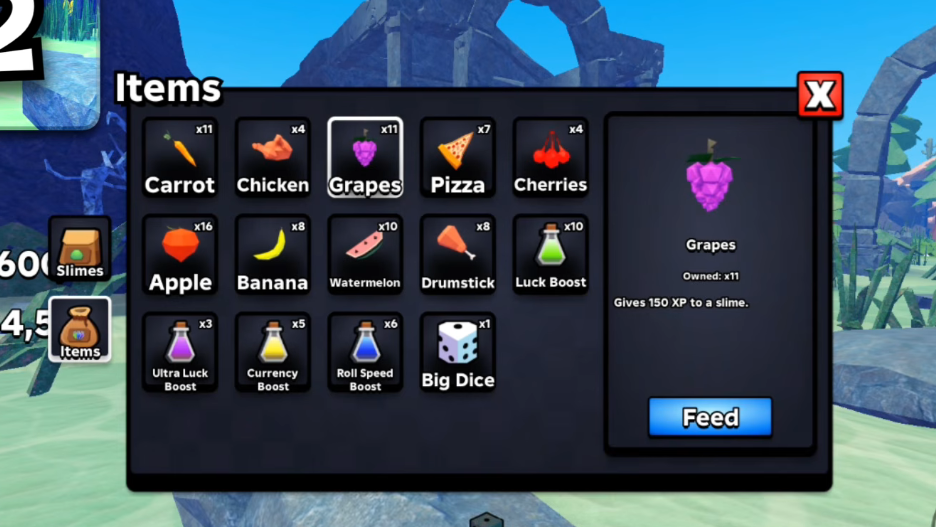
All food items in Slime RNG
Foods are consumables you feed to a slime to grant flat XP. Higher-tier foods cost more to unlock as drops, but they raise the XP per feed in fixed steps of 25.
| Food | XP per feed | Unlock cost (Upgrades → Loot) |
|---|---|---|
| Apple | +75 | 1K Coins |
| Carrot | +100 | 10K Coins |
| Cherries | +125 | 50K Coins |
| Grapes | +150 | 500K Coins |
| Banana | +175 | 2M Coins |
| Watermelon | +200 | 20M Coins |
| Pizza | +225 | 200M Coins |
| Chicken | +250 | 2B Coins |
| Drumstick | +275 | 20B Coins |
To use any food, open your inventory with the backpack icon, switch to the Items tab, select the food, and feed it to the slime you want to level. Higher-level slimes carry more HP and damage into combat zones, which is what makes farming late-game loot viable.
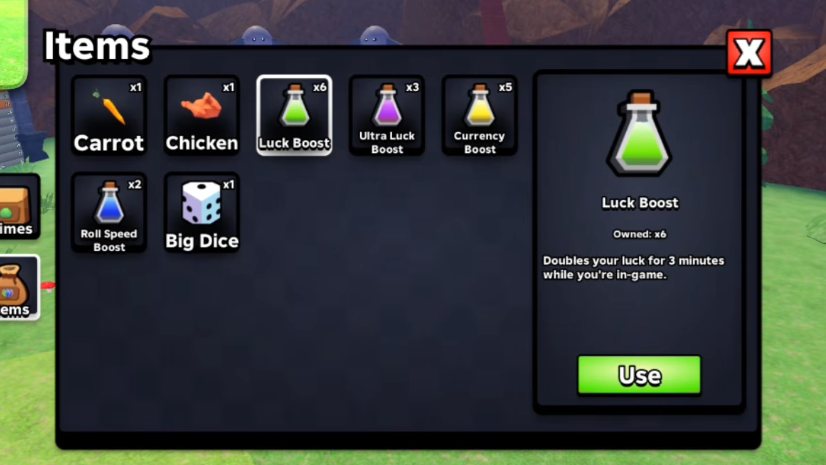
All potion and boost items
Potions are timed buffs. Each one runs for three minutes from the moment you activate it, and you can stack different potion effects together but not the same potion twice.
| Potion | Effect (3 minutes) | Unlock cost |
|---|---|---|
| Luck Boost | 2x luck | 4K Coins |
| Currency Boost | 2x coin income | 25K Coins |
| Roll Speed Boost | 2x roll speed | 100K Coins |
| Ultra Luck Boost | 3x luck | 1M Coins |
Stack a Luck Boost or Ultra Luck Boost with Roll Speed Boost before grinding rare slimes. The combined effect compresses more high-luck rolls into the same window, which raises the chance of pulling rare slimes you need for crafting recipes.

All dice items and what each one forces
Dice override the next roll with a guaranteed outcome. They are not sold for coins. The only ways to obtain them are redeeming Slime RNG codes, very rare loot drops from killing slimes, index completion rewards, and Admin Abuse events.
| Dice | Effect on next roll |
|---|---|
| Big Dice | Guarantees a Big Slime |
| Huge Dice | Guarantees a Huge Slime |
| Shiny Dice | Guarantees a Shiny Slime |
| Inverted Dice | Guarantees an Inverted Slime |
| Jackpot Dice | Adds 3 bonus rolls and a Jackpot on next roll |
Save Jackpot Dice for when you already have a Luck Boost or Ultra Luck Boost active. The bonus rolls inherit your current luck multiplier, so a stacked buff window produces noticeably better Jackpot results than a clean roll.
Goop and how to farm it
Goop is the rebirth currency. Spending Goop performs a Rebirth, which resets your coins and zone progress in exchange for a permanent luck multiplier increase. It does not behave like a regular consumable; you cannot feed it to slimes or use it for buffs.
Goop only drops from enemies after you have unlocked it through the Upgrades tree. The unlock chain is Auto Roll, then 2 Enemies and 3 Enemies, then the Goop drop itself for 10M coins. Once unlocked, every defeated slime has a chance to drop Goop, and that chance scales with mutated and rarer slime kills.

Crafting items: Recipes and crafted slimes
Recipes are item-like collectibles found in specific zones. Each one is grabbed by holding E on the recipe pickup, which permanently adds it to your crafting menu. You then spend the listed slimes at the crafting machine to produce a stronger crafted slime. The crafting machine itself is purchased from the Heaven biome at level 7 for 1M coins.
| Recipe (zone) | Crafted slime | Required slimes |
|---|---|---|
| Cave | Crafty Slime (1/57.4K) | Lucky + Rocky + Mushy |
| Jungle | Thorn Slime (1/330K) | Orbit + Icy + Stump |
| Mushroom Forest | Geode Slime (1/3.11M) | Ninja + Guest + Aegis |
| Redwood Forest | SlimeSlimeSlime (1/42.9M) | 3x SlimeSlime |
| Candyland | Puffy Slime | Unicorn + Petal + Derpy |
| Crystal Cavern | Crystal slime (TBA) | UFO + Blackhole + Bomber |
The rarity of the slimes you feed into a recipe carries through to the result. Using a Big, Shiny, Huge, or Inverted version of a required slime increases the chance that the crafted slime inherits one of those mutations.
How to use any item from your inventory
You can confirm a potion is active by checking for its icon and timer above the roll button. Dice show a small indicator on the roll button itself, so you know the next press will use the dice instead of a normal roll.
How to redeem dice and boosts from codes
Codes are case-sensitive in Slime RNG, so a working code that returns invalid is almost always a capitalization mismatch rather than an expired code. Re-check the letters before assuming it has run out of uses.
The fastest path through Slime RNG is to unlock the full Loot tree early, farm a low zone where you can one-shot slimes for steady food and potion drops, save dice for buffed roll windows, and only rebirth once you have collected the recipes you want from each zone. Items are not optional content here; they feed directly into how quickly your slime collection grows.