Microsoft Edge loads certain processes in the background during system startup to enhance its launch speed. While this can make the browser open faster, it also consumes system resources like memory and CPU, potentially slowing down your computer’s boot time. If you rarely use Microsoft Edge, disabling it from starting automatically can help improve your system’s performance.
Preventing Microsoft Edge from Opening at Startup
Press
Ctrl+Shift+Esc on your keyboard to open the Task Manager. This tool allows you to manage running applications and control which programs start with your system.In the Task Manager window, click on the “Start-up” tab at the top. This tab displays all the applications that are configured to run when your computer starts.
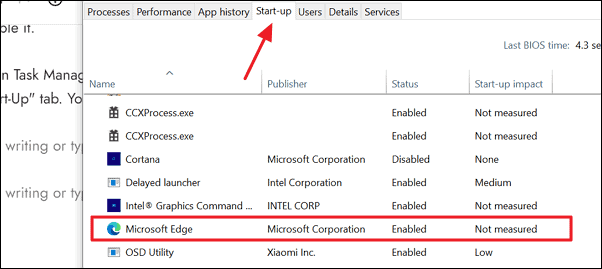
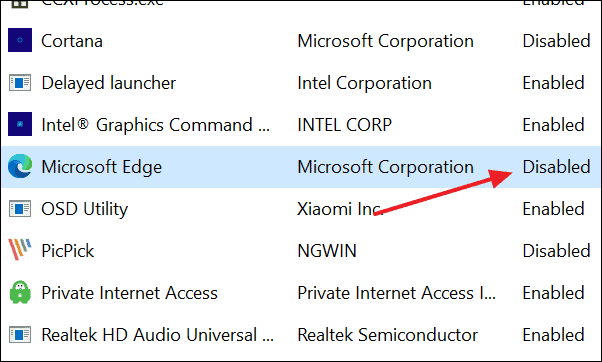
Right-click on “Microsoft Edge” and select “Disable” from the context menu. This action will prevent Microsoft Edge from launching automatically during startup.
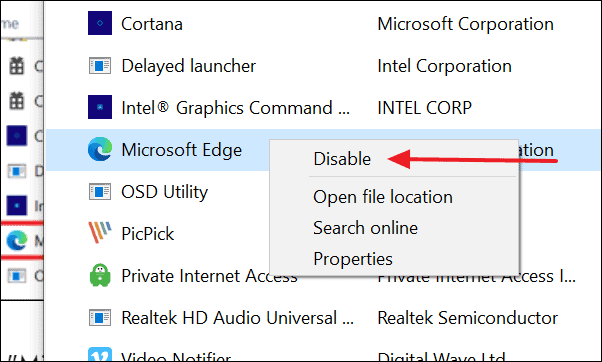
Verify that the status of Microsoft Edge has changed to “Disabled” in the “Start-up” tab. This confirms that it will no longer open when your system boots up.
By disabling Microsoft Edge from your startup programs, you can free up system resources and potentially reduce your computer’s boot time.