Roku streaming devices hide a second layer of features behind private channel codes and secret remote button sequences. Private codes add unlisted channels to your account through the Roku website, while remote sequences open diagnostic menus built into Roku OS for testing Wi-Fi, checking device temperature, or restarting a frozen player.
Working Roku private channel codes
Each code below adds an unlisted channel to your Roku account when entered through the official channel management page. Availability can shift by region, and a few codes now simply redirect to a channel’s regular Channel Store listing if it has since been published there.
ITPC— Streams Apple’s iTunes Podcasts library without needing an iTunes accountCL9D5D— RokuCast, casts HTML5 video from a Chrome browser to your Roku using an experimental extensionradar— Weather Radar, live conditions sourced from the National Weather ServiceH2CLHP— Neon Party Games, free multiplayer party games with an optional paid ad-free tierHappyKids— Happy Kids TV, alphabet, number, and art shows for young childrenArmchairTourist— Armchair Tourist, travel and culture programmingsoctv— The Space Opera Channel, independent sci-fi films and classic titles5ikTV— 5ik.TV, live channels from China, Japan, and South Korea with a non-English interfaceNMJS5— Nowhere TV, free movies, shows, and sports streams (alternate code: H9DWC)Presto— Presto, magic and illusion programmingArirangTV— Arirang TV and Radio, South Korean news, culture, and entertainmentchibchombiatv— El Cartel TV, South American channels including Canal Capital and TeleSURTwitchTV— Unofficial Twitch.TV, Twitch streams and gaming content, some region-lockedsntvdemo— StreamNowTV, indie films across comedy, drama, horror, and actionDNLMPK— MultiLive, live European TV from Germany, France, and the Netherlandsodeon— The Odeon Theater, indie films and cult classics updated weeklyrollem— The Silent Movie Channel, classic silent-era filmsskittertv— Skitter TV, premium live TV including Fox and NBC at tiered pricing296XJKP— EuroRoku, over 300 European channels on a subscription planProGuitar— Pro Guitar Lessons, step-by-step guitar tutorials for all skill levelsFilmRise— FilmRise, free movies, shows, and documentariesGreatChefs— Great Chefs, classic cooking shows from renowned chefsMaddyGTV— MaddyGTV Late Night, indie films and late-night programminganimevice— Anime Vice channelblockbuster— Blockbuster on DemandExtreme— Extreme Sports channelpopflixtv— PopFlix Classic TV channelWWENet— WWE Network
Adding a code applies to your whole Roku account, so the new channel shows up on every device signed into that account, including any Roku devices your kids use.
How to redeem a Roku channel code
Roku remote secret button sequences
Every sequence below starts from the Roku home screen. Press Home the required number of times, then follow with the directional or playback buttons at a steady pace. If nothing happens, return to Home and retry more slowly, since timing between presses matters.
| Button sequence | Menu | What it shows |
|---|---|---|
| Home x5 > Up > Rewind x2 > Fast Forward x2 | Force restart | Reboots the device without unplugging it |
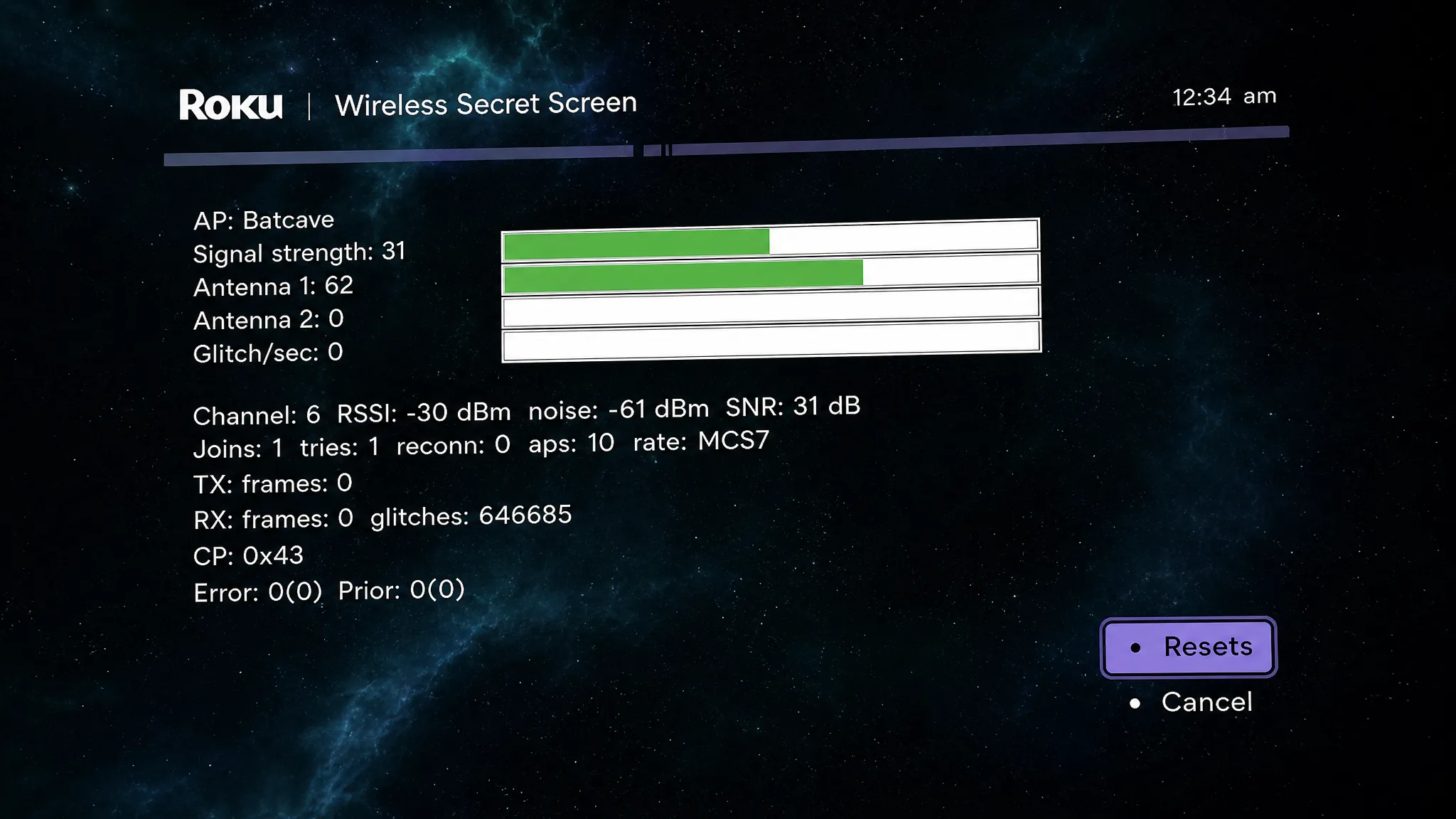
| Home x5 > Up > Down > Up > Down > Up | Wireless Secret Screen | Signal strength, per-antenna data, noise, and channel info |
| Home x5 > Right > Left > Right > Left > Right | Network Insights | IP address, MAC address, signal strength, active wireless channel |
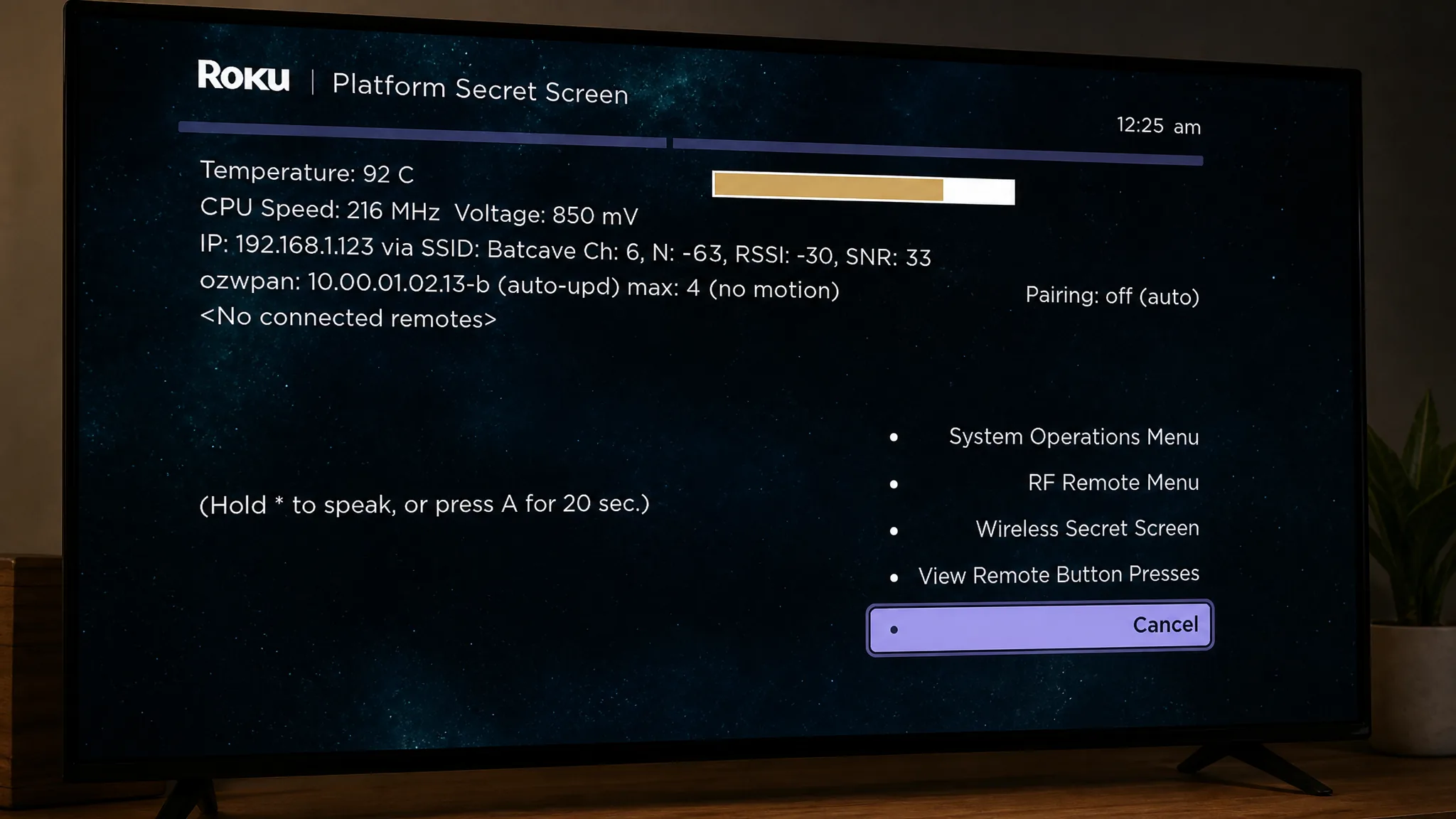
| Home x5 > Fast Forward > Down > Rewind > Down > Fast Forward | System Operations Menu | CPU temperature, clock speed, LED brightness, remote press log |
| Home x5 > Rewind x3 > Fast Forward x2 | Bandwidth limiter | Caps streaming bandwidth between 0.3 Mbps and 12 Mbps |
| Home x5 > Fast Forward x3 > Rewind x2 | Secret Screen | Build date, MAC address, factory reset, software update, Channel Store server |
| Home x5 > Up > Right > Down > Left > Up | Secret Screen 2 | Image service, ad toggle, screenshot format, home banner |
| Home x5 > Down > Left > Up > Up > Up | HDMI Connection Details | Supported resolutions, refresh rates, HDR/HDCP status, connected TV model |
| Home x3 > Up x2 > Right > Left > Right > Left > Right | Developer options | Enables the plugin console for sideloading and screenshots |
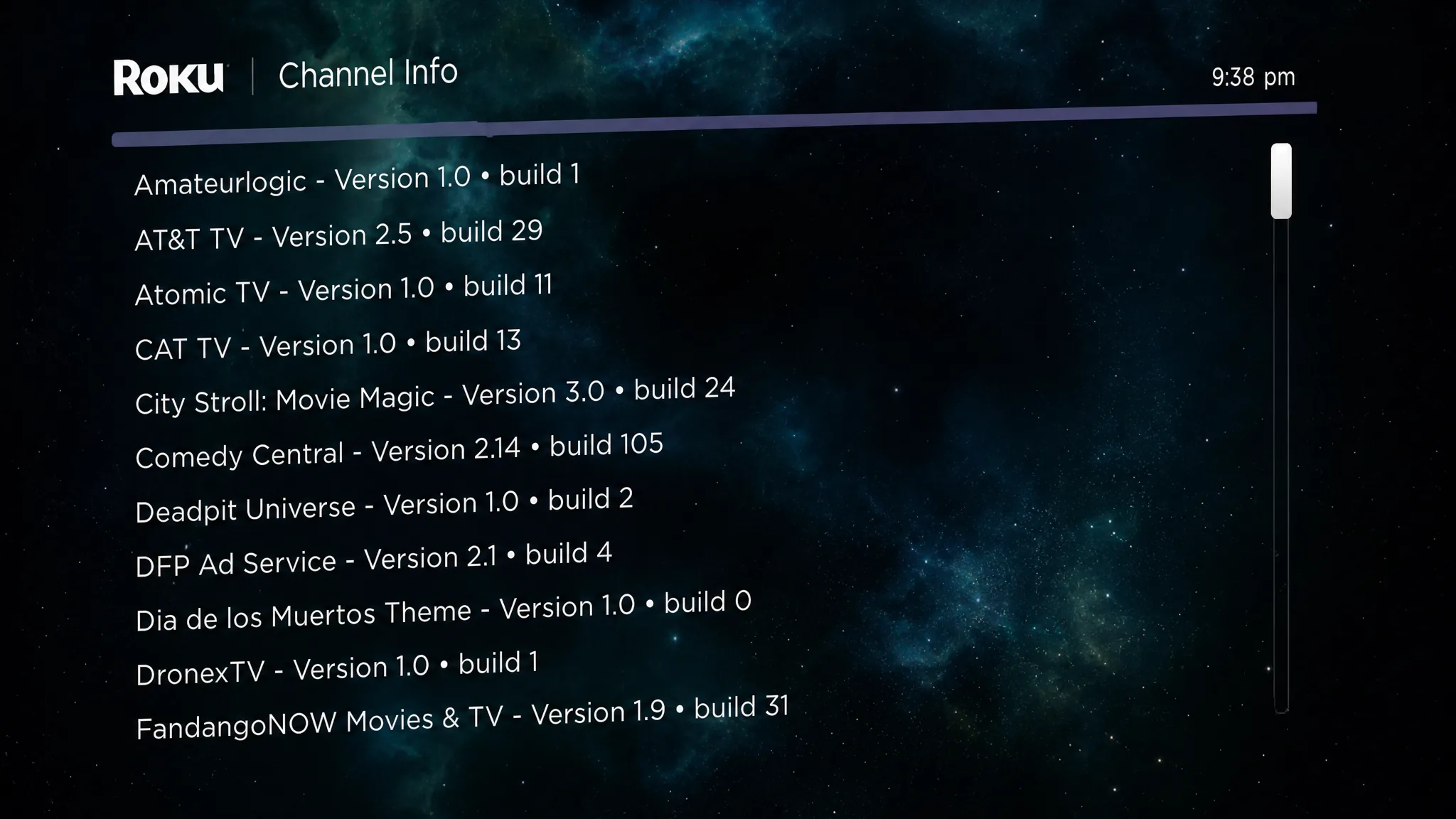
| Home x3 > Up x2 > Left > Right > Left > Right > Left | Channel Info screen | Lists every installed channel with build number and version |
| Home x5 > Rewind > Down > Fast Forward > Down > Rewind | TCL hidden HDR settings | Extra HDR controls on TCL Roku TVs |
| Home x4 > Up > Right > Down > Up > Left > Right | Antenna info screen | Diagnostic data for over-the-air antenna reception |
These screens aren’t officially supported by Roku. Avoid changing values you don’t recognize, since some settings can affect Wi-Fi behavior, display output, or require a factory reset to undo.
Enable developer options for sideloading
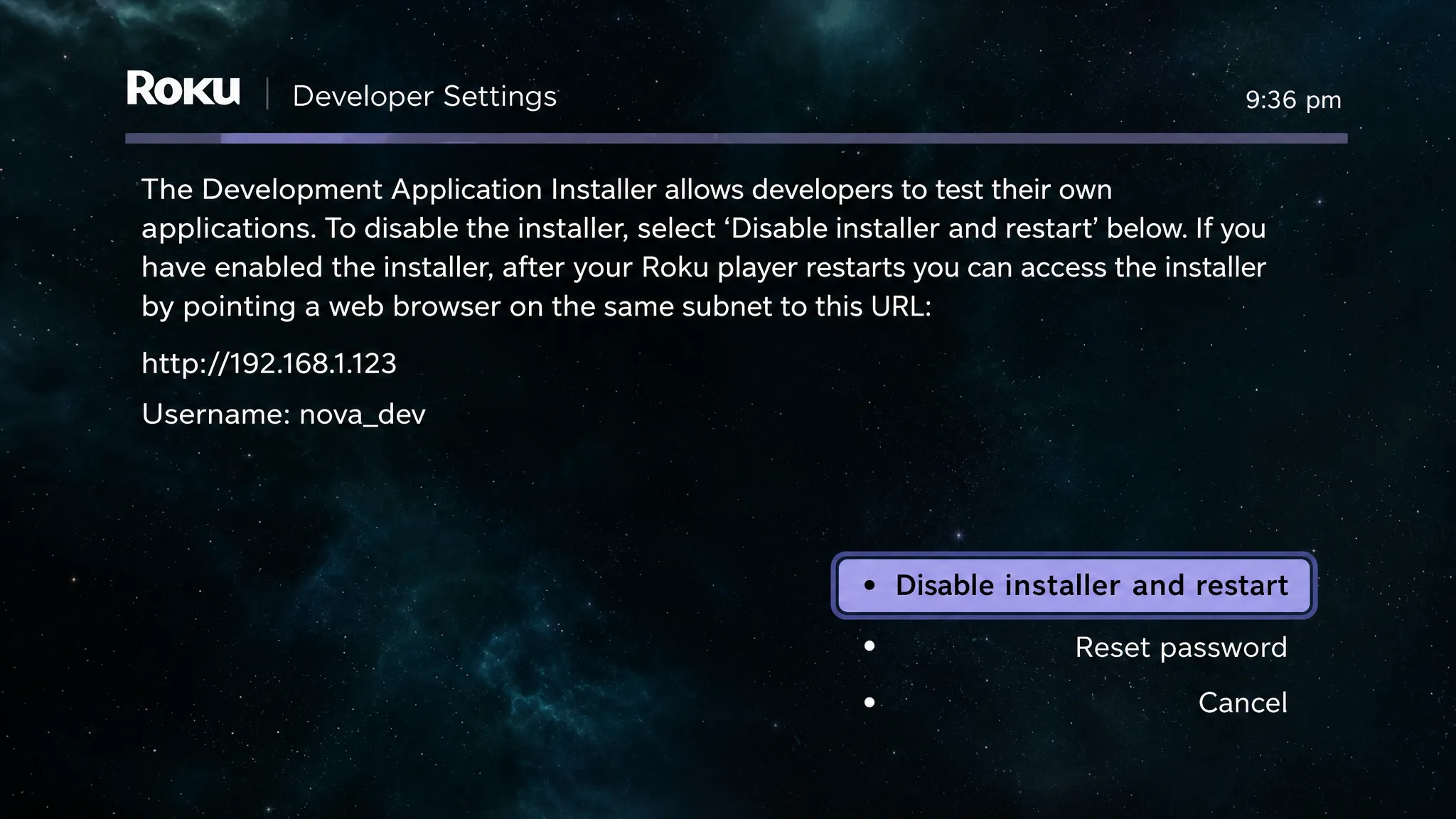
Entering Home x3, Up x2, Right, Left, Right, Left, Right opens a hidden developer screen that exposes a plugin console accessible from a web browser on the same network. It’s built for testing channels before certification, but it also lets you sideload one app at a time or capture screenshots of what’s on screen.
List every installed channel and its build number
Entering Home x3, Up x2, Left, Right, Left, Right, Left opens a full inventory of channels installed on the device, including each one’s name, version, and build number. It’s a fast way to spot outdated apps without opening every channel individually.
Check CPU temperature and clock speed
Entering Home x5, Fast Forward, Down, Rewind, Down, Fast Forward opens the System Operations Menu, which reports CPU temperature, clock speed, and other hardware data. From here you can also disable network pings, adjust LED brightness, and review logged remote button presses.
Test Wi-Fi signal strength at your TV
Entering Home x5, Up, Down, Up, Down, Up opens the Wireless Secret Screen, showing signal strength per antenna, the wireless channel in use, background noise, and glitch counts. It’s useful for confirming whether a dead spot in the house is causing buffering near the TV.
Private channel availability shifts often as developers rotate content or as channels graduate from unofficial codes to full Channel Store listings, so a code that works today may simply redirect to a store page a few months from now. The remote sequences above are tied to Roku OS itself rather than any single channel, so they tend to stay stable across firmware updates on supported models.