
Lenovo users may encounter the frustrating “Error 1962: No Operating System Found” message appearing on their screens during startup. This error occurs when the computer cannot detect the installed operating system, usually due to incorrect BIOS settings, boot order issues, or hardware problems such as faulty hard drives or SATA cables. Fortunately, you can resolve this issue by following structured troubleshooting steps. Additionally, if you’re worried about potential data loss, there are effective methods to recover your files safely.
Method 1: Check BIOS Boot Order
Incorrect boot order settings in your BIOS often cause error 1962. Here’s how you can correct the boot order:
F1, F2, or F12 (depending on your Lenovo model) repeatedly during startup to enter BIOS setup.F10 to save changes and exit BIOS. Confirm by selecting “Yes” when prompted, and your system will reboot.This adjustment often resolves the Error 1962 issue by ensuring your system boots from the correct drive.
Method 2: Enable CSM and Set UEFI Boot Priority
If adjusting the boot order alone doesn’t fix the issue, enabling the Compatibility Support Module (CSM) and setting the boot priority to UEFI first can resolve the problem.
F10 to save your settings and exit BIOS. Your computer will reboot, and the issue should be resolved.Method 3: Run Startup Repair from Windows Installation Media
If your system still won’t boot, performing a Startup Repair can help fix corrupted boot files.
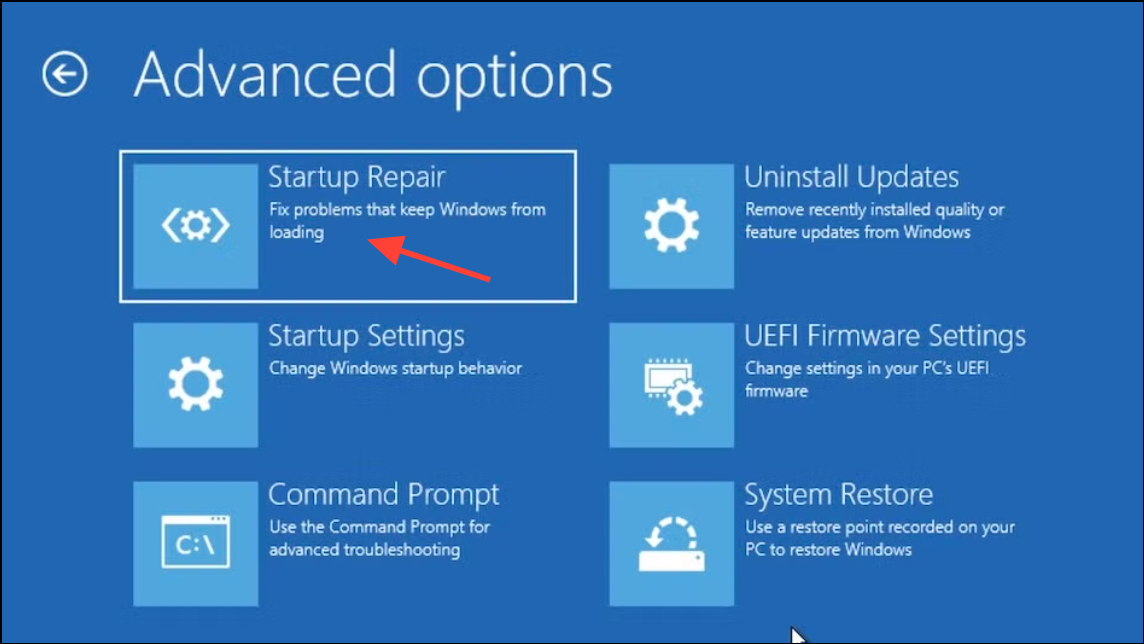
Once the process finishes, restart your computer and check if the error is resolved.
Method 4: Check Hardware and Connections
If the above methods don’t fix the issue, the problem might be due to hardware issues, such as faulty hard drives or loose SATA cables.
Replace any faulty hardware and reassemble your computer. Restart and check if the error persists.
Data Recovery Options
If you are unable to boot into your operating system and are concerned about losing important files, you can recover your data using these methods:
- Bootable USB Recovery: Use a Linux live USB or Windows PE environment to boot your computer and access your files. Transfer important files to an external USB drive.
- Connect to Another PC: Remove your hard drive and connect it to another working PC as an external drive. You can then copy your essential files to a safe location.
- Data Recovery Software: If files appear missing or corrupted, use reliable data recovery software such as Recuva, Stellar Data Recovery, or EaseUS Data Recovery Wizard to scan and recover lost data.
- Professional Data Recovery Services: If your hard drive is physically damaged or severely corrupted, consider contacting professional data recovery services for assistance.
By following these troubleshooting methods, you can effectively resolve the “Error 1962: No Operating System Found” issue on your Lenovo computer and recover your data safely. Regularly backing up your data to external drives or cloud storage solutions can help prevent future data loss issues.





