

Google Meet now offers a 'Tiled' view feature that lets users see up to 16 participants simultaneously in a 4x4 grid. This update caters to the growing need for more interactive and inclusive virtual meetings, allowing everyone to be visible during a session.
The 'Tiled' view is gradually rolling out on the Google Meet web app and is expected to be available to all users by May 1, 2020.
Step 1: To activate the Tiled view, visit meet.google.com and join an existing meeting or create a new Google Meet with several participants.
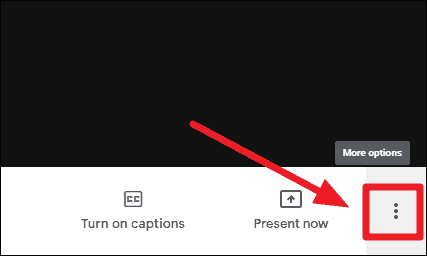
Step 2: Inside the meeting, move your mouse cursor to the bottom of the screen to reveal the control bar if it's not already visible. Click on the three-dot 'More options' button located at the far right of the control bar.
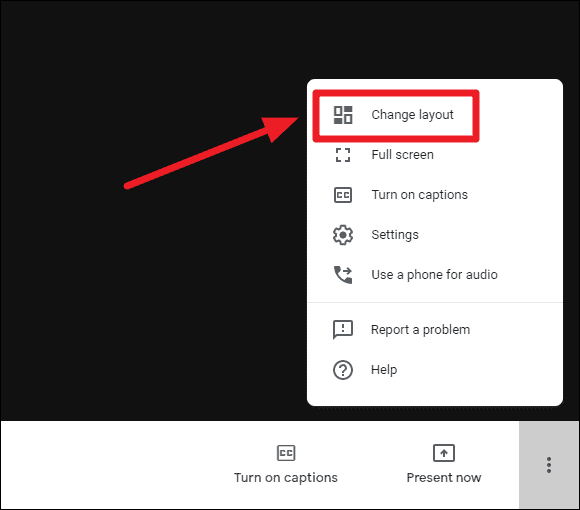
Step 3: From the menu that appears, select the 'Change layout' option to access different viewing layouts.
Step 4: In the layout settings, you'll notice that 'Auto' is selected by default, which adjusts the view based on the number of participants. To see all participants at once, choose the 'Tiled' layout by clicking on it.
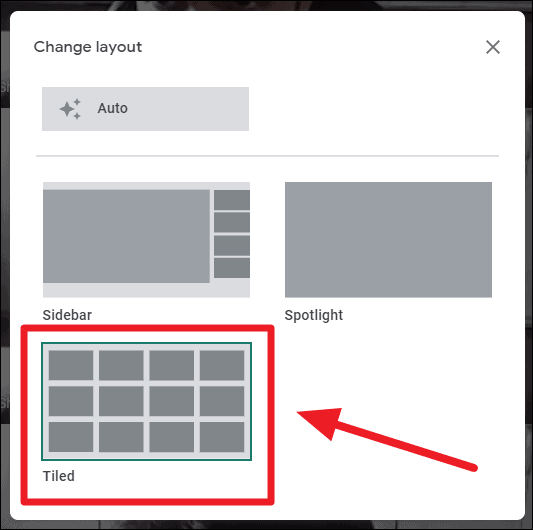
After switching to the 'Tiled' layout, you should be able to view up to 16 participants on your screen simultaneously, enhancing the interactive experience of your meeting.
Here's how the Tiled view appears with 16 participants in Google Meet:

By enabling the Tiled view in Google Meet, you can engage more effectively with all participants, making your virtual meetings more collaborative and inclusive.