Planet Zoo 2 is having a difficult PC launch. For many players, it exits to the desktop, sometimes showing the Frontier crash reporter without a useful error code. It may fail before the main menu appears, during an extended build, or while switching from a zoo to another game area. Every failure risks losing unsaved work. Most options here take only minutes, and when the crash occurs can help decide what to try first.
Quick answer: Verify the game files in Steam, update or clean-install your GPU driver, and disable the Steam, Discord, NVIDIA and Xbox overlays. Then relaunch and repeat what you were doing when it last crashed.
Planet Zoo 2 crash timing and the first fix to try
Note when the game goes down before you change anything. A crash at the developer logo points to a different cause than a crash an hour into a franchise zoo. Change one thing at a time and test the same spot after each change. If you change several things at once, you won’t know which one fixed it.
| When it crashes | Likely cause | Try first |
|---|---|---|
| Before the main menu | Files or GPU driver | Verify files, update driver |
| At logo or loading screen | Graphics startup | Clean driver install |
| Mid-game, inside a zoo | Heavy load or game bug | Lower foliage settings |
| During terrain sculpting | Tool lockup | Release brush before Ctrl+Z |
| When saving | Missing Saved Games folder | Restore the folder |
Planet Zoo 2 PC system requirements
Planet Zoo 2 is a DirectX 12 game. It puts much more load on your hardware than the first Planet Zoo, so a PC that ran the original well can still fall short. It needs a 64-bit processor and a 64-bit operating system. If your graphics card sits below the minimum, a startup crash may be a hardware limit rather than something software can fix.
| Component | Minimum | Recommended |
|---|---|---|
| OS | Windows 10, 11 | Windows 11 |
| CPU | Intel i7-8700K / AMD Ryzen 5 3600 | Intel i7-10700K / AMD Ryzen 7 5800X |
| Memory | 16 GB RAM | 16 GB RAM |
| GPU (NVIDIA) | RTX 2060 (6GB VRAM) | RTX 3070 (8GB VRAM) |
| GPU (AMD) | RX 5600XT (6GB VRAM) | RX 6700XT (12GB VRAM) |
| GPU (Intel) | Arc A750 (8GB VRAM) | Arc A770 (16GB VRAM) |
| DirectX | Version 12 | Version 12 |
| Storage | 40 GB | 40 GB |
Frontier advises putting the game on an SSD. A conventional mechanical drive may make lengthy load screens seem frozen. Windows 10 is no longer supported by Microsoft, and Frontier makes no promise that the game will continue to run on it.
Verify Planet Zoo 2 game files in Steam
Files that are incomplete or corrupted may trigger crashes at startup, black screens, or unpredictable failures while in a zoo. An interrupted download or faulty update is a common cause. Checking the installation takes far less time than reinstalling the game.
On the Epic Games Store, open your Library and click the three-dot menu next to Planet Zoo 2. Choose Manage, then Verify.
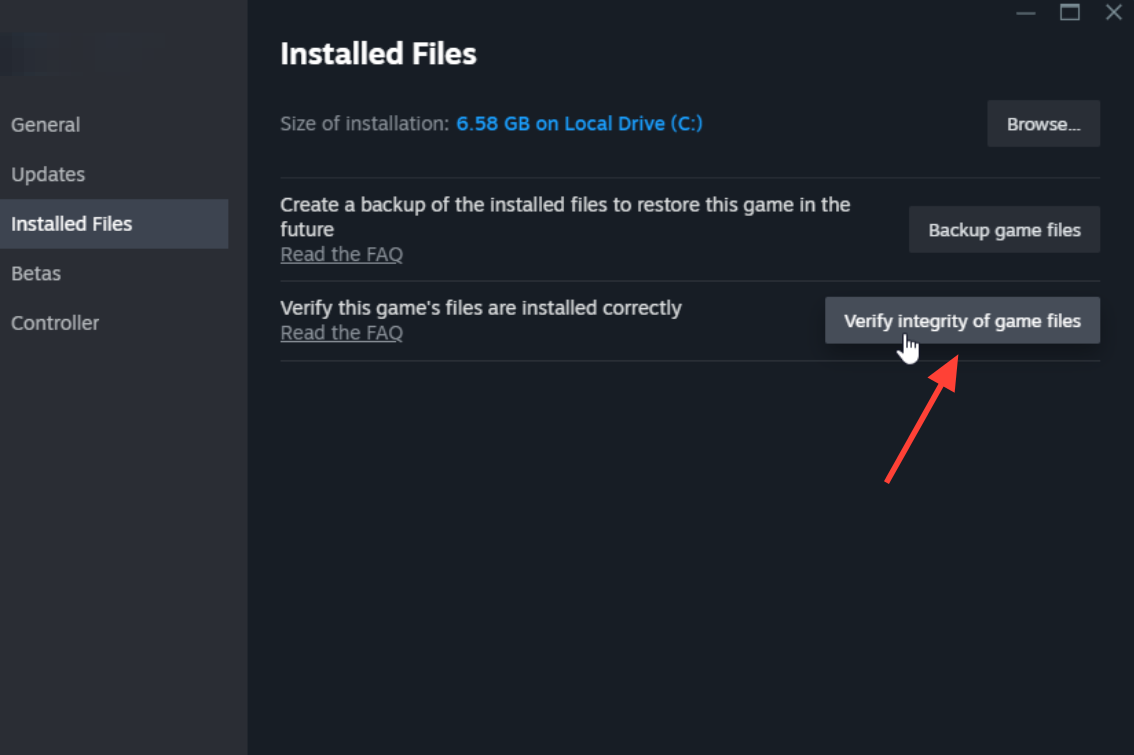
Update, clean-install, or roll back your GPU driver
Many crashes that seem to point to the game itself stem from outdated graphics drivers. Download the latest driver directly from NVIDIA, AMD, or Intel, or use software such as the NVIDIA App. Windows Update isn’t a dependable source for these drivers. Once installation is complete, restart your PC and try the game again.
If you’re already on the latest driver and the game still crashes, do a clean install. This removes leftover settings from older driver versions.
- NVIDIA: Run the installer, choose “Custom installation,” then tick “Perform clean install.”
- AMD: Uninstall the current AMD software from Programs and Features, then install the driver version you want.
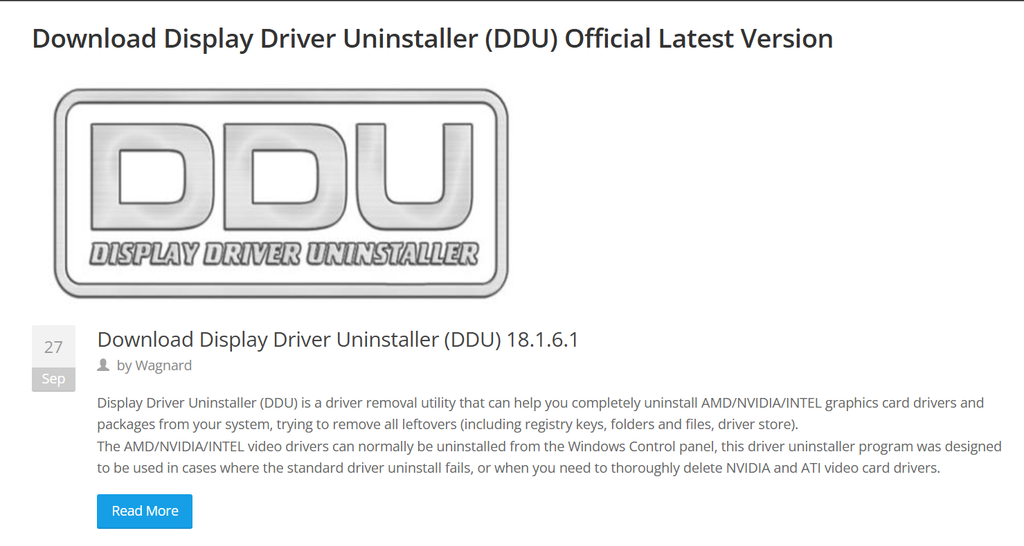
- Any brand: Use Display Driver Uninstaller to fully remove the driver, then reinstall it.
A brand-new driver can sometimes cause a problem the previous version didn’t have. If the crashes started right after a driver update, reinstall the older driver that worked until a fix arrives.
Disable overlays and background software
Overlays and recording tools hook into the game while it runs, and they can conflict with a new release. Turn them all off for one test. You can turn them back on one at a time later.
- Steam: Settings > In-Game, then untick “Enable the Steam Overlay while in-game.”
- Discord: User Settings > Games, then switch the overlay off.
- NVIDIA GeForce Experience: Settings > General, then switch In-game overlay off.
- Xbox Game Bar: Open Windows Settings > Gaming and disable it. Then switch off “Record in the background while I’m playing a game.”
- Other tools: Close MSI Afterburner, RivaTuner, OBS, FRAPS, XSplit, Overwolf, Mumble and NVIDIA ShadowPlay.
If your CPU or GPU is overclocked, set it back to its factory speeds while you test. Planet Zoo 2 can expose an unstable overclock that other games never trigger.
Planet Zoo 2 random crashes mid-game
Crashes during play usually happen while you’re building or managing a zoo. These steps reduce the load and avoid the known trouble spots.
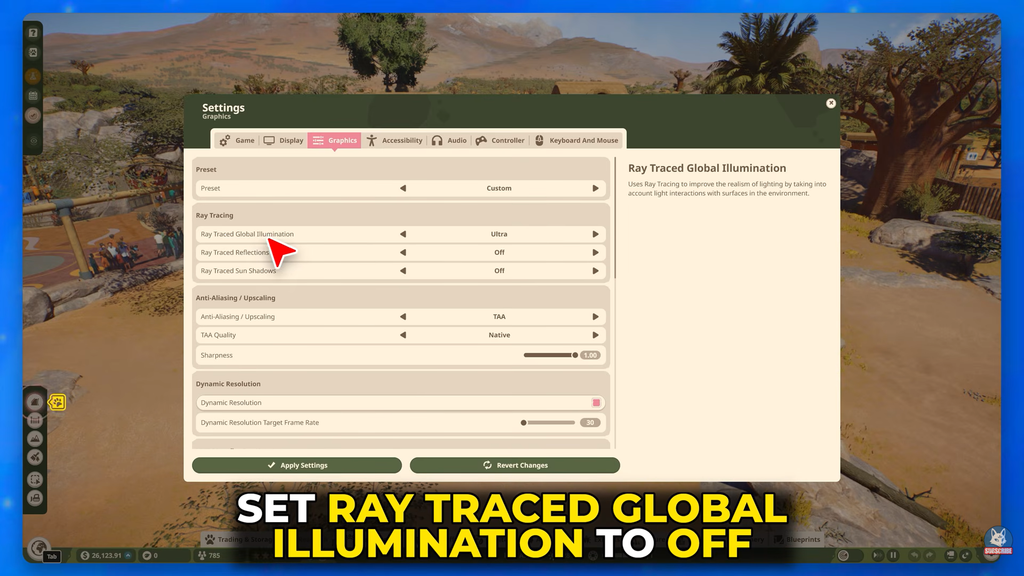
- Lower the foliage setting from Ultra to High or lower.
- Avoid selecting many blueprints at once.
- Avoid Hub transitions while the crashes continue.
- When sculpting terrain, let go of the brush before you press Ctrl+Z.
- Lower the overall graphics quality in the in-game menu, and run the game full-screen.
Next, start a small new zoo and try the same action there. If the new zoo is stable and one save keeps crashing, the problem is that save or its size, not your PC.
Windows fixes for Planet Zoo 2 crashes
Try these after the driver and file checks. Repairing Windows itself makes the most sense when other games are crashing too.
Windows Update and Visual C++
Install all available Windows updates, then restart. If the game closes before you ever see an error, repair or reinstall the Microsoft Visual C++ 2015–2022 Redistributable, both the x64 and x86 versions. Then restart again. Don’t download individual DLL files from third-party sites. If other games are crashing as well, run Windows’ built-in SFC and DISM repair checks.
Antivirus, permissions and laptop GPUs
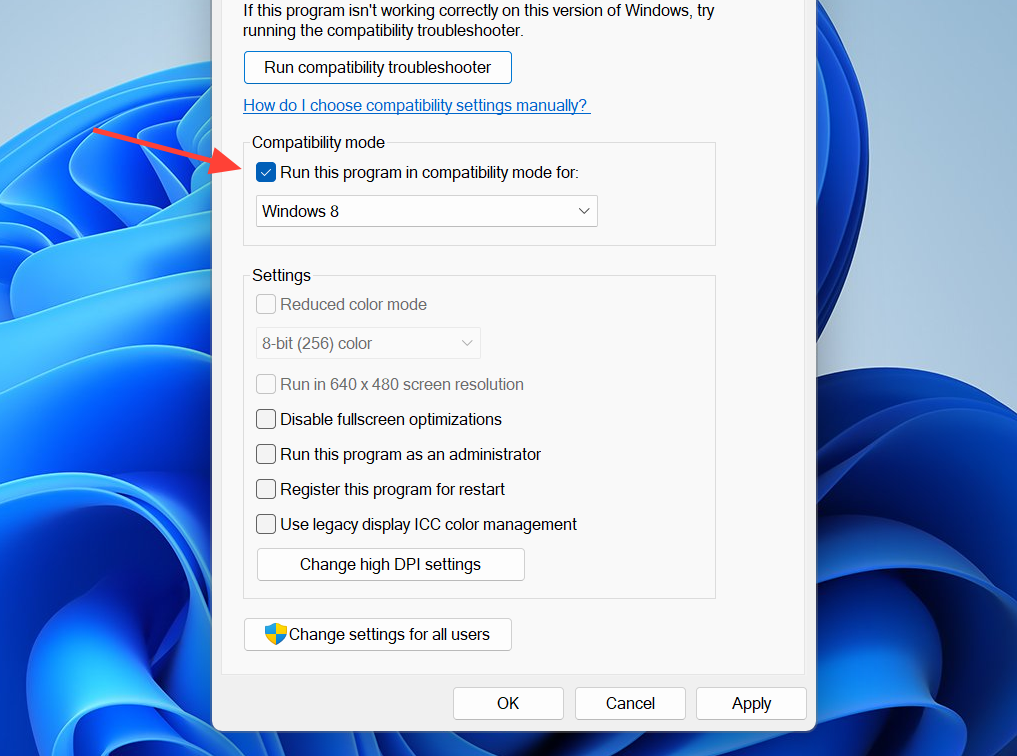
Some antivirus programs wrongly flag the game. Check your antivirus history and add Planet Zoo 2 to its allowed list, but keep the antivirus itself turned on. If the game opens briefly and then disappears, right-click its executable and open Properties. On the Compatibility tab, tick “Run this program as an administrator.” On a laptop with two graphics chips, go to Windows Graphics Settings, add the game’s executable, and set it to High Performance. Keep the laptop plugged in while you play.
Display resolution, heat and PCI-E slot
Lower your Windows display resolution for a moment, then set it back. This makes Windows reapply your display settings. Check that your PC isn’t overheating. On high-end graphics cards, use GPU-Z to check the Bus Interface field. It should show @x16. If it shows @x4 or @x8, move the card to the top PCI-E slot, the one closest to the CPU.
“Failure to save” error in Planet Zoo 2
This message indicates that the game can’t locate your Windows Saved Games directory. The usual save location is C:\Users\%username%\Saved Games. Enter shell:SavedGames in File Explorer’s address bar to check; if nothing opens, the folder has been removed.
Frontier’s support page includes a file called Restore_Saved_Games_Default_Location.bat. Right-click it, choose “Save Link As,” and run it to bring the folder back. Once the folder exists, you can right-click it to move it to a different location if you want. The fix worked if saving completes without the error.
Submit a Planet Zoo 2 crash report to Frontier
When the Frontier crash reporter appears, click Submit instead of closing it. It won’t fix your PC, but it gives the developers data they need to find bugs on their side. If nothing above works, contact Frontier through its Planet Zoo 2 PC support page, which has a request button at the bottom. Include these details:
- Your DxDiag file, plus any screenshots or video.
- Your 17-digit Steam64ID. Find it by clicking your username in Steam, then Account details.
- What you were doing in-game, and anything odd that happened before the crash.
- Whether the crash has happened the same way before, and whether other programs have crashed recently.
A fix has worked when you can reach the main menu and repeat the action that used to crash, twice, without the reporter appearing. If you still crash after every step, reinstalling Planet Zoo 2 is the last thing to try. Delete it and download it again from your library. If that fails too, the cause is almost certainly in the game, and only a patch from Frontier Developments will fix it.