Stock in Ride A Pet runs dry fast. The Gears stall sells radars in small batches, the Food stall keeps a short menu of pet treats, and both empty out as the six players on your server buy them up. Instead of standing around waiting for the cycle to turn, you can force the shelves to refill.
Quick answer: Open the Gears or Food stall and press the green Restock button at the top of the panel. It costs 25 Robux and refills that stall’s stock on the spot.
Where the Restock button lives
Restocking happens at the stalls themselves, not in the main Shop window. Mount a pet at your ranch, sweep up the cash your pets have generated, and ride toward the middle of the map. Everything you buy from these stalls is paid for in cash, so it is worth collecting before you spend Robux on a refill.
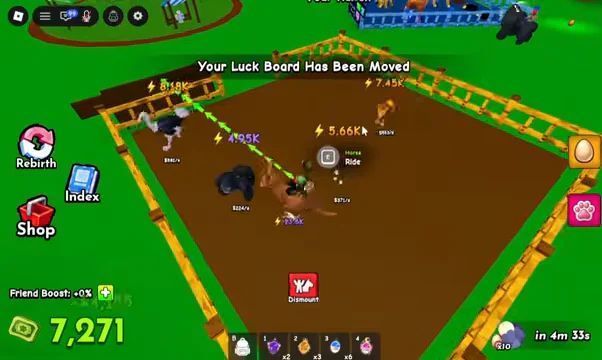
The central marketplace holds four stalls, each clearly labeled: Sell, Gears, Track, and Food. The Gears and Food stalls are the two that carry stock and offer a paid refresh.
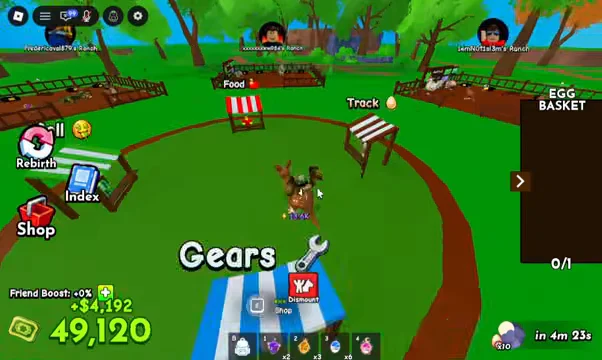
How to restock the Gears stall
Flip on the Auto-Buy toggle for the tier you can afford before you restock. The shop then grabs that radar for you the moment stock refreshes, instead of you racing the menu.
How to restock the Food stall
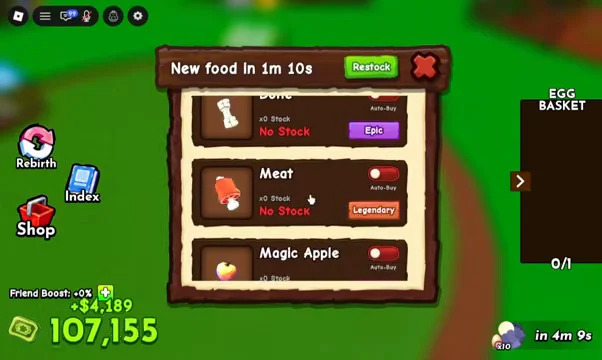
The free restock timer and the server announcement
Paying is optional. At the top of each gear panel, a real-time timer says “New gear in” and shows the remaining time; a cycle can take only a few minutes. When the timer reaches zero, the stalls refill automatically, and a server-wide message announces that the Gear Shop has restocked.
That announcement is the cue to open the stall. Stock is allotted per cycle and it drains between refreshes, so the scarcest tiers are usually gone within moments of the timer flipping. If you are only after the cheap radars, waiting costs you nothing; if you are chasing the top of the ladder, the 25 Robux button buys you a cycle you do not have to share with campers.
What the Gears stall stocks
| Radar | Rarity | Price | Stock seen |
|---|---|---|---|
| Advanced | Rare | $50 | ×5, later ×4 |
| Jewel | Epic | $3,000 | ×3 |
| Royal | Legendary | $20,000 | ×3 |
| Magic | Mythic | $300,000 | ×2 |
| Angelic | Divine | $7,000,000 | Often No Stock |
| Eternal | Ethereal | Hidden when sold out | Often No Stock |
Every radar in that ladder costs in-game cash rather than Robux, and each tier includes its own Auto-Buy toggle and gifting option. Higher rarity means less stock, making Mythic and above the tiers where a paid restock becomes worthwhile. Angelic and Eternal usually display No Stock, and their prices appear only when units are available.
How to confirm the restock worked
After the Robux purchase clears, the panel you are standing in front of updates in place. Red No Stock labels are replaced by a quantity, hidden prices reappear on the high tiers, and the x1 / x3 / x10 buttons become clickable again. The countdown at the top resets for the new cycle. If the panel still reads No Stock, the purchase did not go through and you can press Restock again.
When 25 Robux beats buying the Infinite Radar
Restocking only fixes one vacant shelf, so repeating that purchase for radar rolls quickly becomes poor value. From the ranch, open the main Shop window to buy the Infinite Radar for 399 Robux; its listing says it finds the closest egg and can be used without limit. Because it does not deplete or call for restocks, egg hunting no longer follows the stall cycle.
That same Shop window also holds the Dragon Egg, Giant Egg, and $1 Billion truck gamepasses, all separate from the cash-only gear ladder at the stalls.
For food, paying to restock is mostly a convenience call, since the stall refills itself on the same timer. For gear, treat the button as a targeted tool. Use it when the Divine or Ethereal tier is sitting empty and you have the cash ready to spend the second it reappears.