Gizmos are the Sprite-focused tools that Fortnite loads into your Pickaxe slot the moment you leave the Battle Bus in Chapter 7 Season 3. Because they share the Pickaxe slot instead of taking an inventory space, you keep a full weapon loadout while still carrying a way to bank Sprites. The catch is that the button to reach them is not obvious, and holding the menu open too long can get you eliminated.
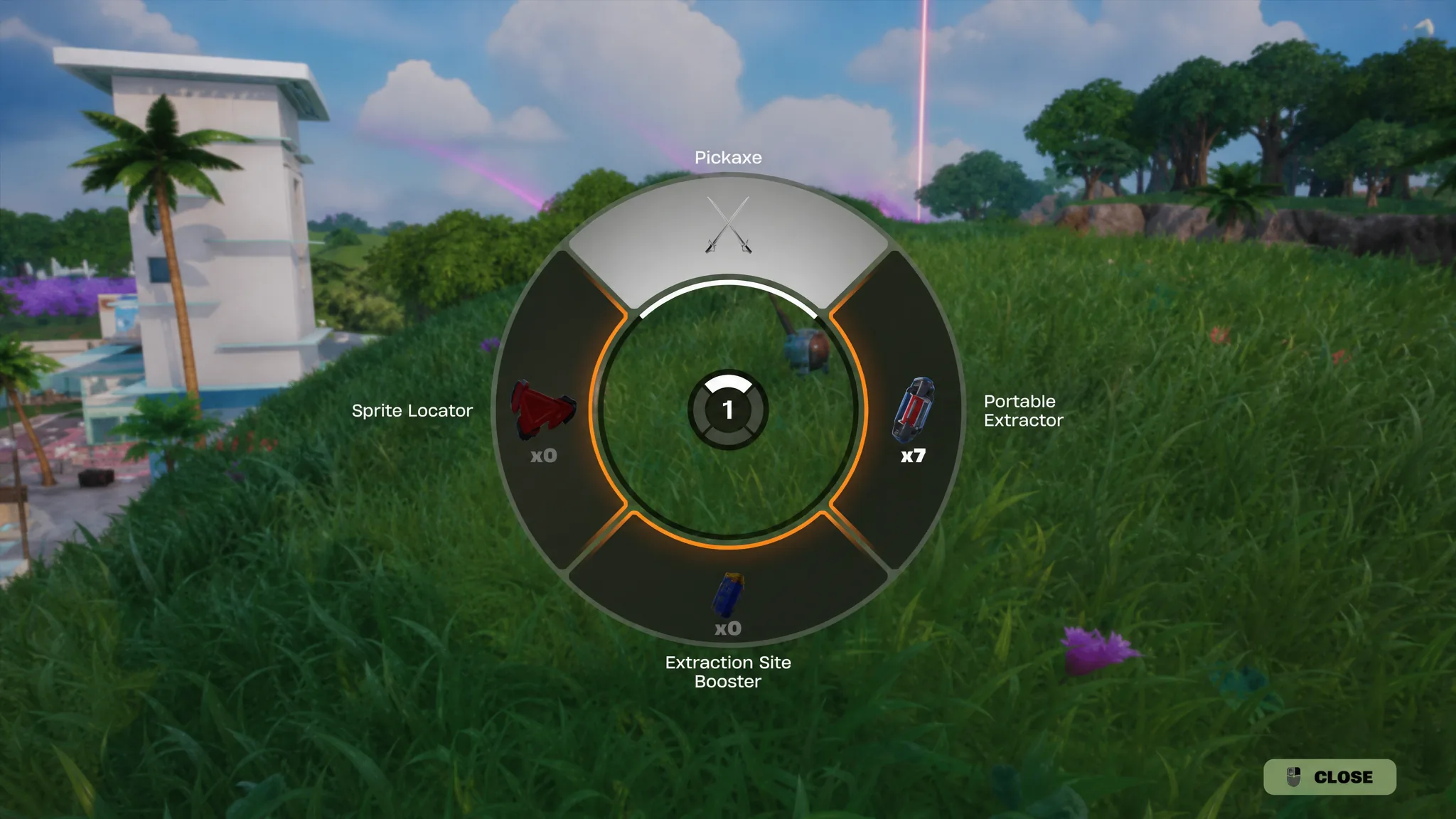
Quick answer: Press and hold your Pickaxe button (F on PC, Y on Xbox, Triangle on PlayStation) to open the Gizmo wheel, then move your cursor or stick to the Gizmo you want and release. That activates it immediately.
Open the Gizmo wheel from the Pickaxe slot
The Pickaxe button does two jobs. A quick press pulls out your Pickaxe, and a hold opens the Gizmo wheel. That wheel works like the Emote wheel, with the Pickaxe at the top and each Gizmo you own arranged around it, along with how many charges you have of each.
| Platform | Default input |
|---|---|
| PC | Hold F |
| Xbox | Hold Y |
| PlayStation | Hold Triangle |
If nothing opens on PC, check the keybind under Settings, then Keyboard Controls, in the Combat section. The line you want is labeled “Pickaxe (Press) / Gizmos (Hold).” You can rebind it to any key you find comfortable.
To back out, just select something else from your inventory, such as a weapon, and the Gizmo is deselected. You can even cancel the Portable Extractor while it is running, which gives you room to react if an enemy shows up mid-extraction.
What each Gizmo does
There are three Gizmos, and you can only run one at a time. Each is a consumable, so it disappears from your wheel once used.
| Gizmo | Effect |
|---|---|
| Portable Extractor | Extracts your equipped Sprite from anywhere on the island, with no trip to an Extraction Site. |
| Sprite Locator | Points you to a buried Sprite Chest that holds a Sprite you have not collected yet. |
| Extraction Site Booster | Calls a Boosted Extraction Crate at an Extraction Site that grants bonus Sprite Dust. |
Use the Portable Extractor to bank a Sprite
When it finishes, the Sprite is pulled from your back and sent to your collection, and you get Sprite Dust in return. A “SUCCESSFULLY EXTRACTED” message and the added Sprite Dust confirm it worked. If you see no confirmation, the run was likely interrupted by damage or canceled early, so try again with another charge.
Use the Extraction Site Booster for bonus Sprite Dust
How to get more Gizmos
Gizmos are not scattered in normal loot. You earn them through progression and spending, and your unused stock carries over between matches for the whole season.
- Reach Level 2 and Level 6 on the Sprite Mastery track to receive 4 Portable Extractors each time.
- Spend Sprite Dust at the Sprite Dust Services terminal found at any Extraction Site.
- Complete certain quests and Bonus Goals that reward Gizmos.
- Finish a fourth Daily Quest in a single day for an extra Portable Extractor.
Because charges are limited, it pays to save the Portable Extractor for a rare Sprite rather than spending it on common Earth, Water, or Fire Sprites you can bank at a normal Extraction Site.
Things to keep in mind
Gizmos cannot be traded, and getting eliminated does not permanently cost you one. They drop for that match but return to your inventory next game. The bigger deadline is the season itself. Your Gizmo inventory persists all season long, then expires when the season ends, so they will not carry into Chapter 7 Season 4. Use whatever you have banked before the season closes.