
Every unit in Anime Expeditions carries three rollable stats that decide how hard it hits, how fast it attacks, and how far it reaches. Strong summons and top-tier equipment still underperform if those numbers land low, so Stat Potential rerolls are the tool that pushes Damage, SPA, and Range toward their best possible values.
Quick answer: Go to the Stat Potential station in the lobby, open Stat Reroll, pick a unit, and press Reroll to reassign its Damage, SPA, and Range grades. A reroll worked when all three numbers change on the unit’s stat panel. Use a Stat Lock to hold a good stat before rolling again.
What Stat Reroll changes
Stat Potential covers three values on every unit. Damage raises the hit numbers, Range extends how far the unit can attack, and SPA controls attack timing. A lower SPA means the unit attacks more often, so a negative SPA percentage is the good outcome, not a bad one.
Each result is graded from Z down to F. Z is the rarest and strongest, while F is the weakest and can even push stats in the wrong direction. One reroll rolls all three stats at once, so the grade you see applies independently to Damage, SPA, and Range.
How to reroll stats at the Stat Potential station

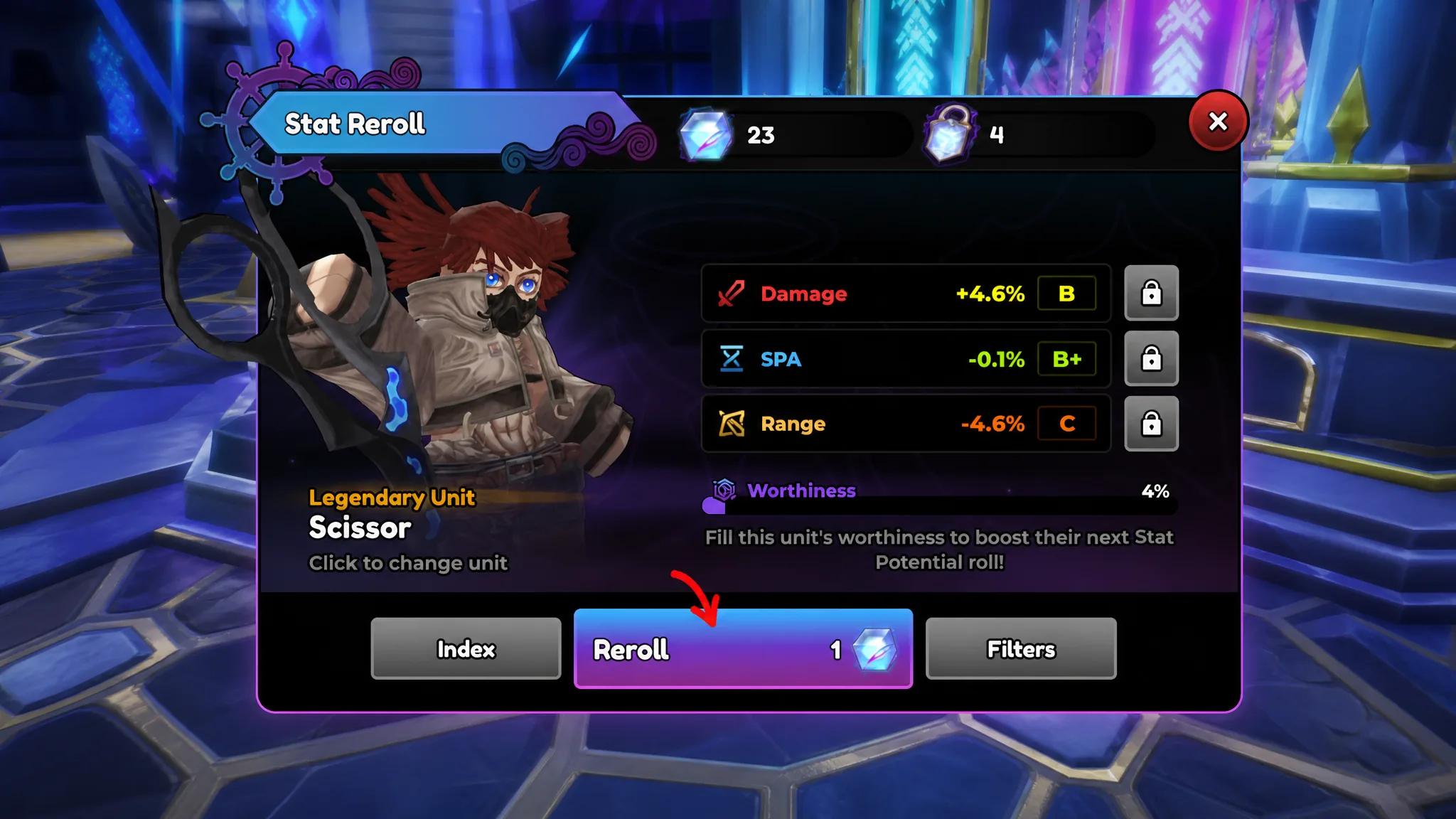
Note: A single reroll can raise one stat while dropping another, since each value is rolled separately. If you already have a high grade you want to keep, lock it first before pressing Reroll again.
Stat tiers, value ranges, and roll chances
Each tier maps to a fixed range for Damage, SPA, and Range, along with a set chance to appear on a single roll. Z sits at the top with the biggest boosts, while the C and F tiers can leave a stat at zero or negative.
| Tier | Damage | SPA | Range | Chance |
|---|---|---|---|---|
| Z | +17.5% to +20% | -12.5% to -15% | +12.5% to +15% | 0.15% |
| SSS | +14.9% to +17.4% | -9.9% to -12.4% | +9.9% to +12.4% | 0.8% |
| SS | +11.1% to +14.8% | -6.1% to -9.8% | +6.1% to +9.8% | 1.75% |
| S | +9.1% to +11% | -4.1% to -6% | +4.1% to +6% | 2.2% |
| A+ | +8.1% to +9% | -3.1% to -4% | +3.1% to +4% | 3.25% |
| A | +7.1% to +8% | -2.1% to -3% | +2.1% to +3% | 4% |
| A- | +6.1% to +7% | -1.1% to -2% | +1.1% to +2% | 5.25% |
| B+ | +5.1% to +6% | -0.1% to -1% | +0.1% to +1% | 8.75% |
| B | +4.1% to +5% | 0% to +0.9% | -0.9% to 0% | 10% |
| B- | +3.1% to +4% | +1% to +1.9% | -1.9% to -1% | 13% |
| C+ | +2.1% to +3% | +2% to +2.9% | -2.9% to -2% | 15.5% |
| C | +0.1% to +2% | +3% to +4.9% | -4.9% to -3% | 23.5% |
| C- | -2.6% to 0% | +5% to +7.6% | -7.6% to -5% | 7.55% |
| F | -5% to -2.5% | +7.5% to +10% | -10% to -7.5% | 4.3% |
Rolling all three stats at Z in one spin, the Triple Z result, is far rarer than the 0.15% single-stat chance because three separate rolls have to line up together. There is no fixed number of rerolls that guarantees it, so a top roll can take hundreds or thousands of attempts depending on luck.
How Stat Locks protect a good roll
Because a reroll changes all three stats, a strong grade can disappear on the next spin unless you hold it. The lock button next to each stat keeps that value fixed while the rest reroll.
Each locked stat consumes one Stat Lock item per reroll. If you lock two stats and press Reroll, that single roll uses two locks. Lock a top Damage grade on your main carry before chasing SPA, and for units that trigger effects on every attack, a strong negative SPA can matter more than Range.
Tip: Do not lock a mediocre third stat only because it is positive. Every protected slot costs another lock on the next roll, so save locks for grades that are genuinely worth keeping such as SS, SSS, or Z.
Where to get Stat Rerolls and Stat Locks
Redeeming active Anime Expeditions codes is the fastest free source of both Stat Rerolls and Stat Locks. Daily and calendar rewards also hand out these items, and leaving the game running for AFK rewards can add more, though those drops are not guaranteed.
For a fixed, reliable amount, complete quests and challenges. Clearing Story Mode maps and grinding the challenge cards awards set quantities of Stat Rerolls and Stat Locks, so push through Story content first before you start burning rolls.
How to transfer stats between units
If a unit has a great trait but weak stats, you can move better Potential onto it from another character. Stat Transfer sacrifices one unit and passes the chosen stats to another, and each transfer costs Gold.
The transfer resets the sacrificed unit’s trait, Stat Potential, and level, so only feed in a unit you are willing to lose. Double-check both sides before confirming, since the left unit is the one that gets wiped and the right unit’s old stats are replaced by the ones you send over.
Because rerolls and locks are limited, spend them on carries that stay in your roster long term rather than temporary units you plan to replace after the next banner. Lock a strong Damage roll on your main damage dealer, keep a solid negative SPA on fast attackers, and stop once a build clears the mode you are targeting instead of chasing a perfect Triple Z on every unit.